VDMX 5 Review

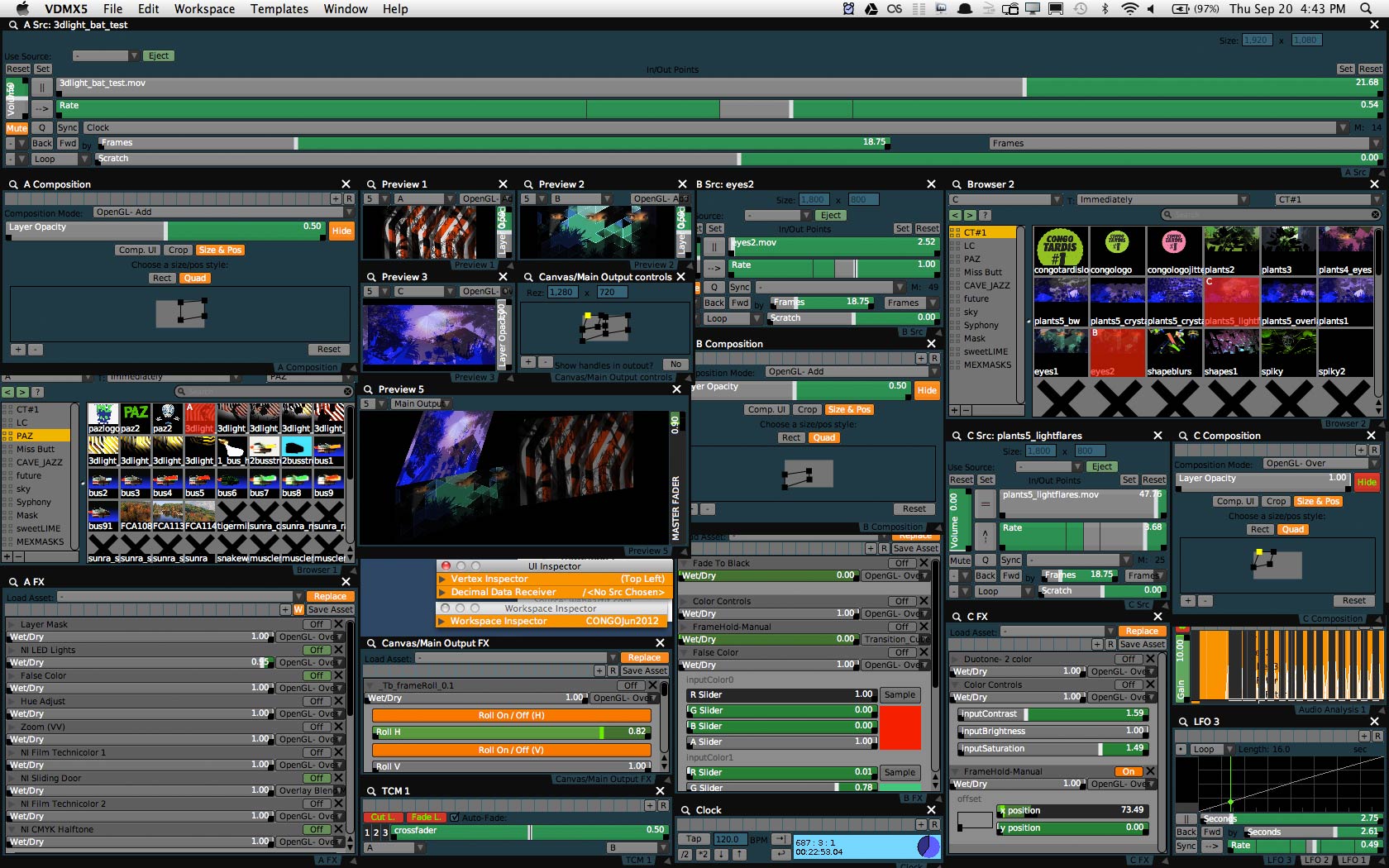
VDMX 5 interface

(Above, a messy example VDMX interface of mine. Click screenshot to see full version)

Here’s a review brewed since I got my review copy back in 2005 (when VDMX first turned 5, says the Vidvox software museum*). Now that it’s 2012 and we’re at Beta version 8.0.8.1, it seems as good a time as any to declare VDMX 5 ripe and ready. Let’s do this.

What is VDMX 5?

VDMX 5 = A ‘modular, highly flexible realtime performance video application‘ developed by vidvox.net.

What does that even mean? The six word executive summary by @Protostarrr :
A hipsters version of After Effects‘ is cute, but misses a crucial difference – VDMX is software built for real-time usage – ie no waiting around for rendering, it means live adjusting, manipulating and sequencing of video clips and video parameters – during a theatre performance, while musicians play on stage, within an installation, or to create some hybrid of what might be called live cinema. Just as hiphop and electronic music producers have long been playing live with audio samples, we now have the ability to shift from a studio production mentality, towards using video samples in a live setting.  This means VDMX must be capable of letting it’s users adapt and respond to any unfolding events – and the importance of having that flexibility is reflected with how Vidvox define their software:

“VDMX5 is a program that lets you assemble custom realtime video processing applications. This is an important distinction- instead of being stuck with a fixed processing engine and a static interface, it gives you the freedom to assemble not only whatever custom processing backend you desire, but it allows you a great deal of creative control over how you wish to interact with your backend.”
VDMX interfaces

(Example search for ‘VDMX interface’ )

So what can VDMX 5 do? 

– Trigger separate clips for playback across different projectors ( a desktop with multiple outputs, or an external graphics card for laptop is also needed)
Mix several clips together to create layered collages and compositions (multi-blend mode options / compositing options / cross-fade options / customisable quartz transition modes)
Map separate video layers onto physical objects (VDMX5  has basic perspective mapping functions, or can send video layers via syphon to other mapping software)
Organise video layers into groups (which allows composition or FX parameters to be adjusted per layer or per group)
Re-route any video layers into other layers / compositions (enables easy creation of visual feedback loops, or addition of more organic complexity with FX)
– Adjust or control any video parameter or Fx parameter easily with an onscreen slider or button – and in turn, control these by various data sources (eg mouse / midi / audio analysis from built-in laptop microphone / LFO oscillators and wave values / midi + OSC controllers / wii controller / iOS or android controller etc ), and these values can be flexibly refined by using a range of in-built math behaviours ( eg invert values, smooth values, multiply values etc).
– Build Control Surface Plug-ins – which are ways to consolidate various controls into a a customised interface ( eg have 4 meta sliders, each of which may control any number of other parameters, when activated )
Capture camera inputs, apply effects to these. Can also record and playback camera samples in real-time.
Capture the visual output from a window of any other application running, and re-route this through the VDMX signal chain (eg mix in a live webcast from a browser, bring in a photoshop sketching window, bring in a skype window etc )
Record your clip-triggering and visual FX experiments to disk (Fast and reliable, records directly into a VDMX media bin for immediate re-triggering / remixing / recording and etc etc )
– Use a built in step sequencer for arranging clip-triggering or FX over time.
Save and trigger presets in extensive ways (global, per layer, per FX chain, and per slider. And more recently, we can cut and paste parameter settings between sliders. Very useful for quickly copying refined parameter and interactivity settings from one effect to another.)
– Tightly integrate customised quartz composer patches and FX, including customised interface elements – where each of these can be controlled by the various methods described above. (It’s hard to overemphasise how useful and powerful this is).
– Use flash, text and HTML files, as well as Freeframe FX.
New : send DMX (Artnet) data – to control / interact with lights / lighting desks… (I’m yet to play with this, but it’s a great addition. Requires a computer to DMX box such as the Enttec ODE. )

There’s much more, but you get the idea – it’s flexible, and can be adapted to suit your project by project needs. These open ended possibilities are both a strength and weakness of VDMX – it’s fantastic being able to make your own customised interface to suit a particular workflow or project, but first time users tend to find can be daunting to approach for first time users.

Below, an example of 3 layers being mapped to suit particular shapes. (The canvas controls can be enlarged for easier mapping / alignment, with pixel increment adjustments on corners, available by pressing arrow keys )
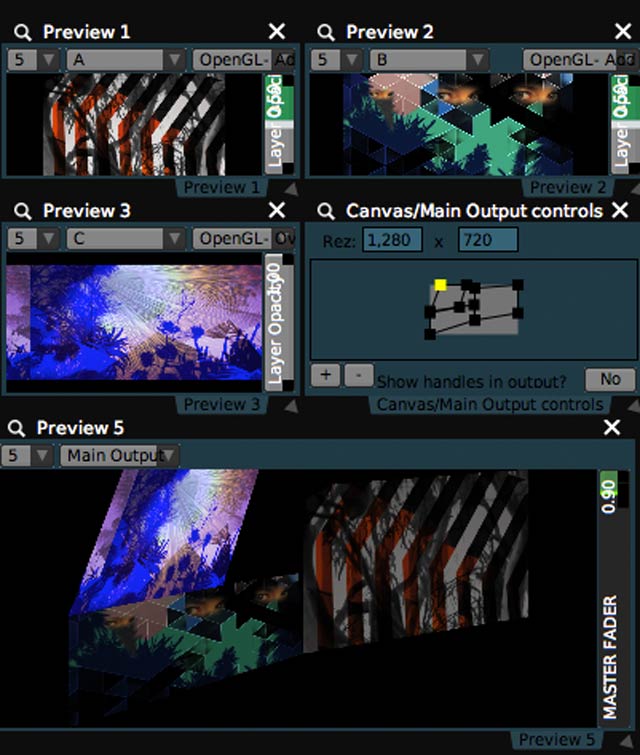
VDMX 5 interface

Understanding the VDMX Workflow

With the above multitude of options, getting to know the ropes is pretty important. Here’s a few learning pathways:

1. Plug N Play… aka ‘explore’ : Even within the downloadable demo software, VDMX5 comes with built-in template projects that can be accessed through the topscreen menu. These can be easily modified and used as a foundation for your own projects. Playing with each template will show some of the features and variety on offer.
2. Vidvox Wiki : Extensive, detailed listing and explanation of the progam’s various parameters. Read over, then go back to step 1 and play some more.
3. tutorials.vidvox.net : In-depth video tutorials from the pixelated horse’s mouth.
4. VDMX forums : Over time, I’ve probably learnt more about the program here than anywhere else – as with any software of depth, the possible solutions to any particular problem posed, are multiple and varied, and am regularly learning new ways to use VDMX through the discussions here. The developers also contribute frequently, debugging problems, clarifying how various aspects work, and helping point beginners in the right direction.

Some Example VDMX Projects

Aka – here’s some links to material I’ve used VDMX for.

– Compositing video for 3 different projections and walls at Cockatoo Island, Sydney. ( Pattern Machine, at Underbelly performance )
– Generating and recording audio-reactive visual textures (with VDMX and quartz) (Visual backdrops for Audego)
– Generating textures and audio-reactive elements, then mapping these to suit physical shapes I’m projecting onto  (Mat Cant music video)
Triggering live video onstage with Gotye (so the right part of each animation happena when the live musicians reach the chorus etc )

VDMX Elsewhere:

How to set up the VDMX basics.. 
Learning VDMX at the Audiovisual Academy, Videos – Part IPart II and Part III.
A 32 minute intro to VDMX (via visual-society)
Iso50 overview of how he uses VDMX …
Connect VDMX to Madmapper (via official Madmapper blog)
How to send multiple outputs from VDMX to Madmapper… (via destroythingsbeautiful)
(Actually, Destroythings is destroying things for VDMX (mostly VDMX ready-quartz patches )
Making loops live with the Wii and VDMX ( 4 video tutorials via moongold)
VJ Kung Fu: AV Sequencing with Live + VDMX + Monome
Using VDMX to create stop motion animation – by synchronising video projection playback with the sequencing of time lapse photos. (by Zealousy )
How to use a window from any other mac software, within VDMX (eg for live photoshop painting etc / via 1000errors)
How to create a 16 frequency graphic equalizer for Ipad Lemur to use sound for controlling various FX in VDMX. (via 1000errors)
Creating a Sound Visualizer with VDMX + Unity 3D (via creativeapplications)
Experiments with Quartz Composer patches in VDMX (via Goto10 at vimeo)
Telecommuting the mix: VDMX, Syphon, CamTwist, and Skype (via noisepages)

Requirements :

  • Mac computer with an Intel processor
  • Mac OS X 10.6 or later
  • NVIDIA or ATI Graphics Card
  • 4+ GB of RAM
$349US  – Refreshingly, this licences the user to run VDMX on up to three different computers for personal use. On one level it’s a very generous licence – but on the other, it’s merely acknowledging the likely practices of most digital artists (across many workplaces, home, venues, installations, multi-screen set-ups etc). At any rate, very handy.
Educational pricing = $199
There’s also a ‘Starving Artist Discount’ – ‘Put your skills to work helping out the VDMX community and you can get a license of VDMX5 for only $199 USD.’

Verdict?

While VDMX 5 is overkill for some people, and others might prefer the complexities of say of MAX/MSP or coding their own software, for me it strikes a great balance of depth and accessibility. Complex results and interfaces are possible, with relatively little mental investment. Once that initial learning has happened, it’s a very versatile tool, easily refined to suit each project (eg for this gig, let’s make the playback timeline fill the whole screen, so we can fine tune tiny little loops more easily – or let’s create 3 media bins so it’s very clear which samples to trigger for each of 3 stage characters – or let’s emphasise the FX palette here.. etc etc). VDMX 5 has evolved over many years, taking on board much user feedback, as well as introducing users to better ways of approaching video signals and introducing all manner of nuanced interface elements and processes. There is a lot of significant functionality in the program, but it’s in the nuanced details of those features, that the merits of VDMX 5 really come into play. Take it for a test drive….


[[*VDMX software museum visitors and yesteryear software interface fetishists might also like: VDMX 2 review (2002) or VDMX 4 review (2003) ]]

by j p, September 20, 2012 6 Comments

Ghostly Forest Projections Near Hanging Rock

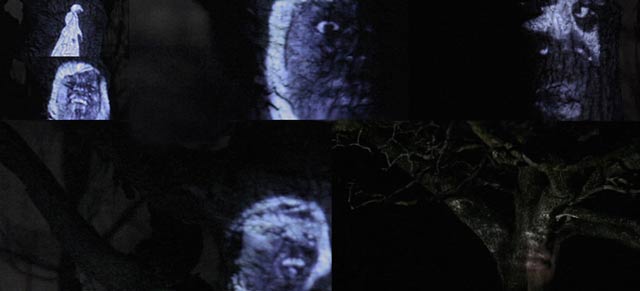
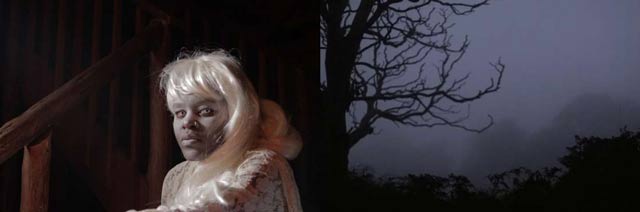
TZU beautiful ghost projections in forest

For the TZU ‘Beautiful’ music video, I recently found myself out near Hanging Rock, with plastic-wrapped laptop, projector, camera, lights, and a mini-crew – filming ghost projections in the night winter rain. Despite the weather drastically mismatching the supposed forecast, slowing everything to a snail’s pace, we salvaged the situation as best we could, reworking the storyboard around some of the less exposed areas, and soldiered on until about 5am. Not the end result we’d aimed for, but am happy with what we managed in the circumstances. So it goes. Full credits/links, and a series of behind the scenes photos over at the project page.

by j p, September 17, 2012 0 comments

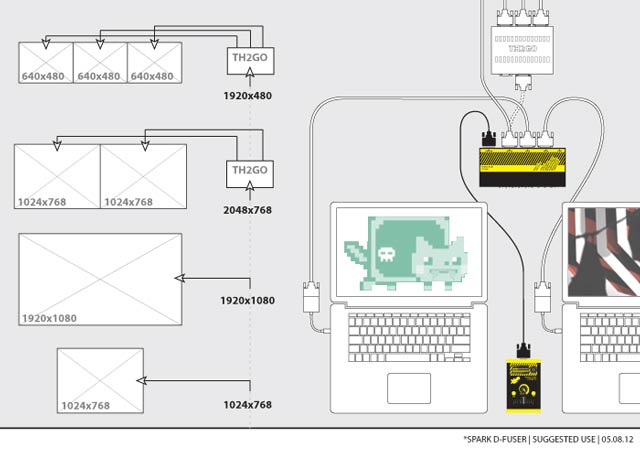
Crossfading Laptops with the *spark d-fuser

NOW READY FOR ORDERING….

“The *spark d-fuser lets you crossfade between laptops. Whether switching between presenters or pushing avant-garde pixels, hands-on control for mixing DVI and VGA signals is now available in a compact and affordable package.

If you want to know more or see it in action, jump straight to the demo video below. If you’ve been following the project, the message is simple: pay and yours will be produced. Orders are being taken on September 5th, the manufacturing run will then take six weeks from there. Price: £710 ex. VAT, £852 inc. VAT.”

We have no jetpacks, but soon it seems, we will have affordable mixing of digital video signals, thanks to the herculean efforts of 1 x Toby Harris aka *spark aka ‘card carrying Timelord amongst VJs’.

Rattling along in the tube, in between bankers reading 50 Shades of Kindles… Toby envisioned a better world, a world where VGA and DVI signals could be mixed without repercussions, and a world where smooth crossfading could happen with a device carried in your backpack. It was also a world that he would have to build himself, and a couple of years down the track, here we are. In between priming conveyor belts and supervising factory elves, Toby was kind enough to answer these questions:

What have you enjoyed about using your prototypes during performances?

The mixer for me is in support of the laptop, and damn have I enjoyed pushing crazy pixels with my laptop. Using it two-up in a D-Fuse show with Mike, I’m freed from the need for it always to be my mix on screen, so I can rip down, prepare and experiment with the mix. Makes me push things much further! That, and I’m freed from the fear of my bleeding-edge software taking down the whole show.

The surprise for me was the tap buttons, I love them. The original prototype didn’t have them, I envisaged a cross fade from one to the other and not much else. But in the expression of interest form, lots of people asked, so on they went… and wow, tapping in a slight variation of the main laptop’s mix is a really powerful thing.

What sorts of firmware additions would you like to see / develop? (you mentioned multiply mode as an option once?)

Mix modes are in the realm of possibility. The processor has the power to compute a soft-edged key for every pixel, so there’s some per-pixel computing power to play with. Additive is the bangs-for-your-buck upgrade here, and I think would really creatively transform what is possible with the mixer as you get the ability to truly composite the two sources together. I talk about this at the end of the demo video, and I’m really trying to make it happen.

I’d love to see the processor lose its line limit of 2048 pixels, there’s the naive observation that TripleHead 800×600 should be possible given that is actually fewer pixels to process than the 1920×1080 it definitely can handle. TV-One have in a way already answered this in the 1T-C2-750‘s sibling, the 760. It can do 2880×900, but at the price of being able to fade both sources.

You have to realise however it’s TV One’s processor, and the firmware that runs it is very much their core product, their IP. There’s no possibility of them giving it to us to do, and them doing anything for us is a decision intertwined with their wider business plans. I wish it weren’t so, but the sheer fact they designed the 750 and produced it for an affordable price is something to wonder at.

Why release the firmware as Open Source?

The frustrations above should go some ways to answer! If you need to tweak, extend or optimise, its in your own hands, and in the best case that gets shared back to all. Simply put, its what I would want if I were in the community buying one. There is more to it than that, and there certainly are risks, so let’s call it an experiment and see how it plays out.

Why has the video hardware world been so slow in releasing affordable digital mixers?

Well, one thing I can say is that this project has been one of the most ridiculous things I’ve ever done in terms of effort and reward – if I had an eye on the bottom line I’d have stuck to bespoke development and on-site fees! There’s obviously a quantity sold at which point that changes, but I’m not sure that quantity is comfortably within the VJ market, and I’m doubly not sure of that if you have the overheads of a worldwide corporation.

I’m surprised however that VJs haven’t been able to co-opt generic presentation kit, the 750 is as close as I’ve seen.

In what kinds of ways have you played (live) with the OSC / DMX and ethernet capacities?

The simple answer is I haven’t – the ability to have that is everybody’s gift back to me for doing this project, along — hopefully — with additive mixing. Come the first D-Fuse gig with the new controller, we’ll be rocking the OSC out. Finally we can cut between visual laptops and have the audio follow!

Orders for the *spark d-fuser are being taken on September 5th, with a manufacturing run from the 10th September. Price: £710 ex. VAT, £852 inc. VAT

[Another interview with Toby, about Live Cinema, in 2008]

by j p, August 30, 2012 0 comments

Making Music Videos With Portable Jungles

Aka A Music Video in 3 Steps:

1. Re-created Middle-Earth on a kitchen tabletop… (hello – every backyard plant we have, hello – fallen moss covered branches from the park across the road, hello – turntable, hello – flashing bicycle lights, hello – wonky lampshades and plastic toys.)

2. Made some custom animations (Quartz composer, After Effects), and projected these onto Middle-Earth, using software to manipulate the projections (VDMX, Madmapper, quartz composer).

3. Recorded the results (Canon 7D, various lenses), and edited together (Premiere).

Song = Make Believe (Original mix), by Mat Cant (Scattermusic)

And yes, animated, directed and edited by myself in whirlwindy short amount of time.

Next up, a floating forest of bonsai plants strapped to drones..

by j p, August 28, 2012 2 Comments

Learning With Quartz Part 5: Using Twitter Hashtags + RSS Feeds in VDMX

[[ UPDATE : A while ago – Twitter changed the way it deals with RSS, thereby breaking the technique below… ]]

(( For possible solutions, try this labnol work-around (video explanation)
or try this discussion over at the Inklen / Serato QC forums... ))

As part of doing live video for a event a few months ago, I was asked about displaying a live twitter feed for it.
“I can probably take care of that.” Which meant…

QUARTZ COMPOSER WRESTLING

Ingredient 1:

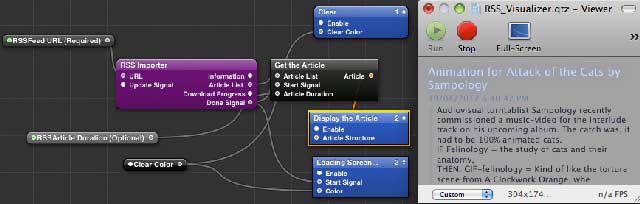
The basic RSS patch that comes with Quartz Composer…

RSS quartz composer patch

(Entering the skynoise RSS feed URL into the patch on the left, generates the output in the viewer on the right.)

Ingredient 2:

Generating an RSS feed from a hashtag.

Although Twitter doesn’t offer up RSS feeds, it turns out they can be generated by using the following URL

http://search.twitter.com/search.atom?q=%23hashtag

and replacing the word hashtag with your word of choice eg

http://search.twitter.com/search.atom?q=%23KONYtattoos

http://search.twitter.com/search.atom?q=%23cannibalsvisitingIKEA

http://search.twitter.com/search.atom?q=%23butmorriseysaysmeatismurder etc

Which means – this URL can be used to populate your Quartz patch, with any tweets published by people using that hashtag.

So I edited that quartz composer file, so each tweet was composited the way I wanted, in a 16:9 image, and details like date etc were turned off.

(Uploaded here: https://skynoise.net/qtz/RSS_twitter-test2.qtz.zip )

Problems:

The Quartz patch didn’t seem to continually update from the twitter RSS feed – but starts to cycle back through older tweets in a loop after a while… ( like 10-15 tweets ? ) + couldn’t figure out how to display author, alongside the text … Tried looking through the RSS info to find author parameters, then see where these might be adjusted within the quartz patch, no dice.

Solution: ( via @lumabeamerz / aka Mr.Coge : check his software out! )

I posted a description of the problem to pastebin and asked on twitter.. and @lumabeamerz kindly wrote back *and* adjusted the quartz patch, noting…

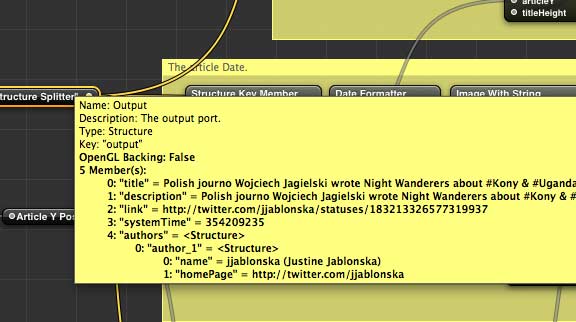
“If you put your mouse pointer for a moment to a structure’s output, you will see what is “flowing”, like this:

So, 0-4 are indexes, “…” are keys. Basically, we need the member of key “authors”, which will give use an other structure. The index 0 member of structure is good for us, and give us an other structure. From the last structure, we can extract the name with the key “name”. It is simple if you are a programmer, since the method is same in the Obj-C land to access structures. For the updating, I connected a Signal patch to the RSS patch’s update signal input, so it actually refreshes in a 60sec. period.”

Here’s the final quartz patch, edited by @lumabeamerz – which continuously updates any tweets from a particular hashtag, and displays author name alongside. Maybe it’s a useful template for you to modify however you wish?

https://skynoise.net/qtz/RSS_twitter-test3-lumabeamerz-edit.qtz.zip

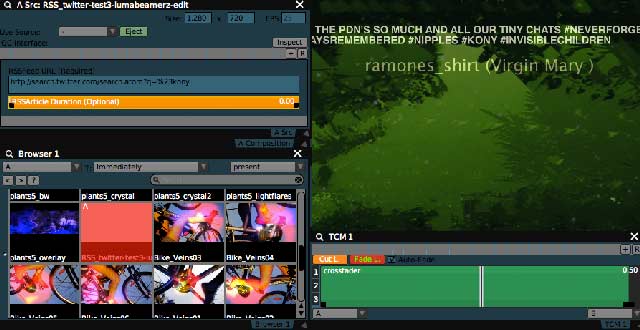
And below, the patch inside VDMX:

vdmx twitter rss quartz patch

(See above: when triggered from a VDMX media bin, the quartz patch, gives an option for writing in your preferred hashtag. If you want to add more controls, such as changing the colour, size or position of text – you can publish the relevant parameters in quartz, so they become available for use inside VDMX. )

For more industrial options – see the *spark screenrunner

Recently Gathered Quartz Composer links: 

– cv at github shares 14 example quartz patches as tutorials, available for download and playing with.

– Superfleamedia 3 part tutorial about using iterators-in-quartz-composer

– http://quartzcomposer.nodepond.com/ – Patches and various how-to’s, by Nodepond – specialists in Mac OS-X and iOS graphic tools.

– Pixelnoizz on how to turn a quartz patch into a Pixelmator filter

Learning Quartz Composer Part 1
Learning Quartz Composer Part 2
Learning With Quartz Part 3: DIY Anchor Rotation FX for VDMX
Learning With Quartz Part 4: 3D Objects With Video Textures in VDMX

by j p, July 18, 2012 7 Comments