Resolume Avenue 4.1 + Arena 4.1 Review

A recent major upgrade at the good ship Resolume, takes both Resolume Avenue + Resolume Arena to version 4.1.

Resolume Avenue 4.1
Pitched as a HD video mixing desk, this does everything you’d expect of modern VJ software. Detailed specs listed here.

Strengths At a glance?
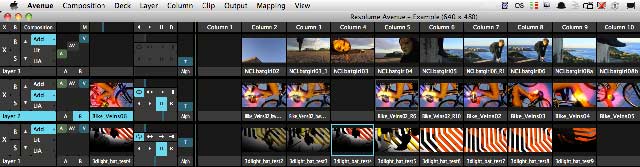
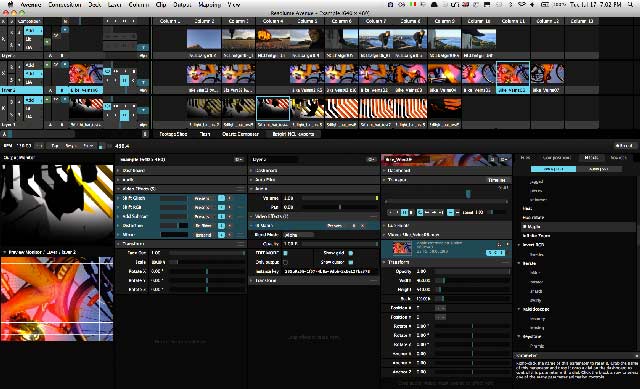
– Instrument like interface  – built for performance. The screen layout simplicity that avoids complex navigations. It’s built for quick and easy triggering…and gives an easy visual overview of the overall composition, selected layers, and selected clips. There are plenty of nice interface touches – eg click columns for all clips in that column to play on each layer ( makes for easy switching between combinations of clips ), or adjust transition timings for new clips in each layer to trigger as fades or cuts, and custom dashboards for quick viewing of FX parameters.
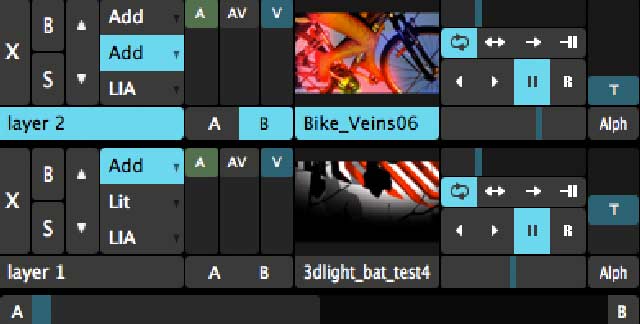
( Above : the tightly arranged mixing section )

– Solid playback of video, audio and image files. ( Includes very fast custom codec, DXV, see below for codec comparison.)
Audiovisual effects and integration – many features including VST FX for audio, easy combining of audio and visual effects, and the ability to easily crossfade just the video, audio, or both at once.
Plays back interactive compositions – eg quartz composer, and flash animations including AS2 and AS3 scripting. It also handles FFGL plugins eg the IR Mapio plug-in which can be used for mapping videos to projection surfaces.
midi / osc – use any hardware or virtual controller – and nicely, it includes preferences for starting clips an adjustible few milliseconds further in the timeline to deal with delays that midi triggering can incur.
BPM Tempo + Snapping – Everything can be linked to the global (Beats Per Minute) tempo to create a fully synchronized audiovisual performance. Automatically pitch the audio and video and synchronize parameter automation. Use the beat snap function to trigger clips in sync with the beat.
Audio analysis – Utilise environmental sound to bounce any clip parameter to the music.

New to 4.1?
Native Syphon support on MacOSX. This means you can re-route Resolume into other video apps, and vice versa. ( hello madmapperVPTquartzjitterVDMXModul8Unity Game Engine etc )
Layer Routing – ‘create a clip that takes the input from any layer below’. ( All kinds of remixing and compositing capacity )

And The Flipside?
Some complexity and versatility is lost with the design decision to streamline the interface performance. eg You can’t easily preview, compare or adjust effects on 2 or more layers at once. I also asked a group of Australian VJs who’ve used Resolume much more than me, what they’d like improved:

– some still prefer earlier versions for stability reasons (V4 crashes – with V3 decks loaded / when too many notes are fired in Ableton)
– lack of a search function in the file browser + effects list
– needs a text tool
– needs an audioreactive timeline like v2.0
– midi can sometimes be inconsistent

Generally though, people seem pretty happy with the evolution to version 4.
( Thanks to VJ Zoo / Richard De Souza / Vdmo Kstati / Simon Kong for input )

Avenue 4.1 Requirements

– € 299.00 Euro for 1 computer. (50% discount available for staff/students) ( Includes all 4.x.x updates, eg 4.1.1 that came out just as I got ready to press publish)
– Windows 7 or XP: ATI Radeon 9600 or better. NVIDIA GeForce FX 5200 or better. 2GB RAM.
– Mac OSX 10.4.9 or later. Intel processor. Quartz Extreme graphics card (Resolume is not compatible with integrated Intel graphics processors). 2GB RAM. DXV Codec.

Resolume Arena 4 Media Server

Arena has all the features of Avenue aaaaand..

– Screen Warping & Video Mapping  – In the advanced output window you can now create as many slices from your composition and position and transform them to your liking – good for multi-surface projections. New – route layers directly to slices, masking and cropping now added to the Advanced Output of Arena – and use bezier curves to map video onto curved screens.

– Soft Edge – With soft edging to seamlessly project 1 widescreen image with 2 or more projectors. Or wrap around the composition for 360 degrees seamless projection.

– SMPTE Timecode Input – “With SMPTE Timecode input you can run you clips in sync with anything you want. Lights, lasers, even fireworks!”

– DMX Input – Control Arena from a lighting desk using DMX. It works similar to MIDI so it’s very easy to configure. Input can be done via ArtNet or an Enttec DMX USB Pro.

These features will appeal to some ( esp perhaps PC users who don’t have access to the easy mapping capacities of the mac only Madmapper ), an interesting option compared to much more expensive hardware media servers.
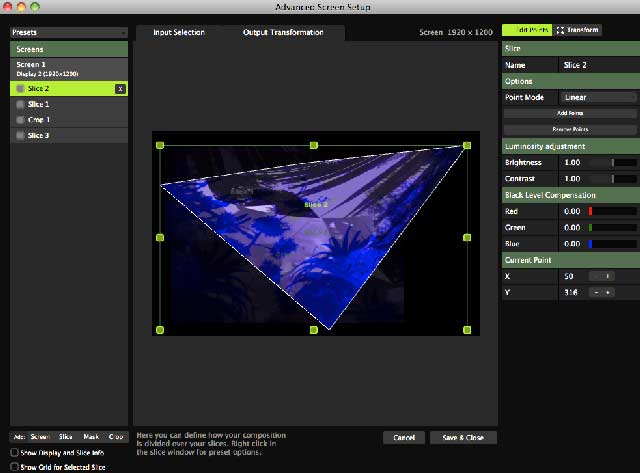
resolume arena 4

(Above: the mapping related bits inside Arena’s advanced output. )

Arena 4.1 Requirements

(Same tech requirements as Avenue 4.1)

€ 699.00 Euro for 1 computer. (50% discount available for staff/students)

BONUS ROUNDS:

Check out the Resolume Manual / Resolume forum and the Resolume ‘Stock Footage Shoppe’ which now includes customisable quartz patches alongside stock footage.

“We’re always saying generative content is the future, so it’s about time we proved it! The original Quartz Composer patch is included to create endless variations yourself”

DXV + High End Codec Comparison

H.264 helped popularise web video with it’s intensive file shrinking while maintaining a lot of visual quality. It’s terrible for real-time VJ software though, because of the relatively painful CPU intensity required to decode it. I do use it sometimes ( the Canon DLSRs record natively as h264, and sometimes I’ll just throw a clip straight in, and it’ll play fine, but it’s generally best avoided. Photo Jpeg at 75% seems to work nicely on most platforms, though Apple Pro Res and AIC give a slightly better image quality when a gig / clip needs more detail. So where does DXV fit into this?

“Regular video codecs require the CPU to decompress the frames before they can be pushed to the videocard for display. With our DXV Codec video frames are decompressed by the videocard’s GPU which can do this much more efficiently than the CPU. The DXV codec can also store the alpha channel. This is essential for preserving translucency in complex video compositions.Hardware accelerated playback is only done when played in Resolume – the video will play in any other software but it will not be hardware accelerated.”

A quick lo-fi test for comparison’s sake then?

1 minute 1920 x 1080 / Pro Res video in Resolume Avenue 4.1 with no FX.
(On a 2010 macbook pro running the usual hundred apps / million browser tabs open)

Codec File Size CPU Playback
Pro Res 1.41gb  116%
DXV 1.37gb 54%
AIC 380mb 126%
PhotoJpeg @75%quality 405mb 96%
H264 50mb 170%

(Note: Pro Res + AIC plays/encode on mac, only play back on PC)

Other high end codecs worth a look at? AJA software codec / DNxHD / Cineform HD / Sheer codec by Bitjazz
 Resolume 3 Review, 2008

by j p, July 17, 2012 0 comments

Higgs Boson Explained in a Cake Recipe

Thank you, @fustar! (+ fustar.info).

“It’s like zoologists trying to determine if they’ve discovered a new species of butterfly by looking at a meadow through binoculars. From 16 miles away.”

From the above Guardian article, I learnt that all the matter we can see in the universe accounts for only 4% of the total, and the Higgs Boson might help us figure out the other 96%. That seems odd in a Douglas Adams kind of way, that we’re so blindly adrift. And he would’ve been thrilled today if he were still around. Though he’s probably flicking someone with a towel somewhere inside that 96% we can’t see.

The Higgs boson, the Guardian also explains – is the force-carrying particle that helps transmit the effects of the Higgs field. And the Higgs field? A kind of cosmic “treacle” spread through the universe. As particles travel through the treacle they slow down, lose energy and get heavier. Kind of like cake mixing really.

And so, a significant day for science, a landmark that’ll be looked back on in decades and centuries to come apparently.

And then the next thing in my feed full-screen floors me… I don’t mean to get all Californian on your ass – but these are some of the thickest slow-motion barrels I’ve ever seen anyone surf through – we’re talking some serious overhanging slabs of ocean here. We’re talking some serious mass. Try keeping your jaw up at 2.29, 3.33, 4.29, 5.23…..  Physics eh?

[[That was by Chris Bryan. Also check out his 12 minute show-reel shot with the same super-slo-mo Phantom cameras (in an underwater body).]]

by j p, July 5, 2012 0 comments

Amon Tobin Taxed : ISAM AV in Melbourne

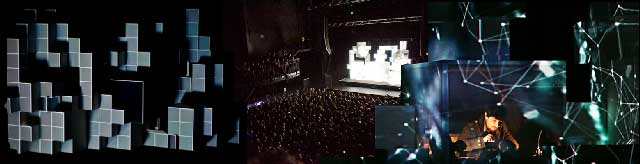
amon tobin isam melbourne performance

Apologies if you’ve arrived in search of Tobin Tax discussions (a tax on market speculation proposed by Nobel Laureate James Tobin as a way of managing exchange-rate volatility..). Here we have only a murky swamp of audiovisual performance questions, all of them generated by Amon Tobin’s recent performance of ISAM in Melbourne.

ISAM?
– AKA  >> An album. And a projection mapped, audiovisual extravaganza, premiered at Mutek, 2011.
– Lengthy behind the scenes article, including video and storyboard examples .. over at the Touch Designer blog, the software used to run the show.
– Pixel creation by V Squared Labs and Leviathan, production design by Alex Lazarus, stage design and set design by Vitamotus.
– And yes, the stage set was designed to fit within a few inches of biggest possible travel container. Precision mapped, video glimpse.

Ramblings / Rants / Observations

1. First up – some congratulations are in order – ISAM’s a stunning and well fleshed out achievement, raising the technical benchmark for live audiovisual shows. And perhaps because of that, the next 22 points are an assortment of thoughts the show triggered during and after. What is this live audiovisual thing, anyway?

2. Some of my favourite bits were the more imaginative transitions – the projected video morphing between different content, while simultaneously transforming the type of perspective being overlaid on the cubes. ( eg shifting from a scene where the three dimensionality of the cubes were being emphasised – with each surface mapped as walls / textures of a spaceship… and then a zooming morph that ‘flattened’ everything to more of a cinema screen showing a spaceship shrinking away into the distance…). I remember thinking these bits appealed because they were moments where imagination seemed more dominant than visual plug-ins or render farm hours.

3. How much of this was real-time, how much was choreographed? Does this matter? Paging Toby. From my vantage point, it was clear that the visual director/ technician / booth operator was doing very little behind his console for many of the tracks, arms literally folded as he leaned against the desk.

4. “It’s like we’re watching something that happened 12 months ago”, said a friend, referencing the online saturation of ISAM over the last year, and perhaps, that the visual creativity was mostly employed long ago in pre-production, rather than the live arena.

5. If you were looking at the audience for most of the gig, it would’ve been hard to tell whether they were at a screening or a concert. Does this matter?

6. After the visual avalanche – the outside world seemed more vivid… and on several occasions while riding my bicycle home afterwards, I found myself thinking – this is way more beautiful than the show –  the crisp and vivid  silhouettes of spotlit cathedral architectural elements ( flanked by fluffy night clouds ), later – a golden second floor window streaming light out onto a bunch of autumn leaves, composited within a mostly pitch black sky, and while crossing train tracks, looking right and catching bright red train lights reflected in the curve of shiny metal train tracks, glistening lines in the dark. ISAM is visually exquisite – but something bugged me – and it’s possibly the complete emphasis on synthesised environments, which alway seek to simulate but can never quite get there. A lot of the charm of Amon Tobin’s music comes from the way he uses field recordings and everyday sounds as part of his heavy digital processing – I wonder why the visual aspects weren’t considered the same way?

7. The window reveals of Amon inside the structure worked great, the lighting perfectly compositing him within the overall picture. Where and how else could rear lighting have been used playfully with the structure?

8. The music! Oh yes. Almost forgot. Periodically closed my eyes, and alternately felt the music was less – or more – interesting without the visual. Lots of the set featured luscious sound, but after a while the compositions themselves struggled to distinguish themselves from the rest of the set. The bass heavier finale hinted at directions it could’ve gone in, and friends mentioned the after-show DJ set by Amon was musically much better.

9. Wonder how modular / flexible that structure and overall software system they have is – how easily could they re-fit / re-model the shapes differently in another space?

10. What would the combined creative crew do differently if they were starting this project from scratch again? How much could their combined system be considered a platform / foundation for a more flexible / organic approach next time?

11. If it did feel a little bit like early cinema viewings, where the audience swoons at a train coming at the camera, where will the process of video-mapped surfaces go from here?

12. Are we starting to see an increasing divide between what’s possible with a few clever friends with some imaginatively deployed DIY tools – and larger scaled spectacles with matching budgets and limitations?

13. What’s with the overdose of mechanical sci-fi imagery? Galactic Giger transmissions might be contributing to the oversaturation, but surely there’s room for a projection mapping palette that expands beyond a Quake skin, to aesthetics that might include organic shapes, lifeforms, or even characters (whether narrative driven or not)? Not everyone has to be Gangpol Und Mit, (1000 people band, yo!) but other spatial composition palettes are possible!

14. Yes, there was more than visual-machine-lust, we also got geometric deconstruction – sophisticated even, but still, there it was, almost like a logo popping up logo for a software plug-in, the virtual form outlined, crumbled and rebuilt. What other ways can we play with spatial composition?

amon tobin in Melbourne, 2012

15. I was definitely transported at times, enchanted.

16. DJ as cloud? The kinect bit was effective, transforming the stage cubes with a swarm of Amon dots, as he manipulated his DJ booth gear. Was kinda arbitrary though, equivalent of stepping on a giant FX pedal during a song, and letting it utterly dominate the composition. Which is fine… but yes, trains coming towards the camera. Great effect – how could it be integrated meaningfully?

17. The audience was often quiet, near motionless. Weird for a music gig of an esteemed producer. A constant nearby soundtrack? People laughing in an excitable disbelief ( kind of like a cough-laugh) as though they were watching a sideshow circus of things that possibly shouldn’t be happening.

18. Overheard outside: “I think Melbourne is now out of weed.”

19. No matter the cost of the algorithm or render farm rental, an object artificially shattering into pieces still looks like 90’s desktop publishing. Or Lawnmower man. If you’re contractually bound to deconstruct, stylise it to some interesting degree, or show us some actual ruins, or some hybrid of your go-pro kite in Baghdad and your abstract shape plug-in of the moment.

20. So you’ve watched / listened to ISAM in Montreal, Melbourne and Manchester. How different were those shows? How different could they be?

21. Was that a pair of stacked Christie projectors?

22. Who knew the Palce in Melbourne went 4 levels high? New to me and quite the vantage point from up there, gave the cubes a much more pronounced 3D effect, from the floor it definitely felt much more cinema screen flattened rather than 3dimensional.

23. I was impressed by ISAM rather than seduced by it. Undeniably a really accomplished show, it deserves the praise, but I’m wondering if it left other live-video-heads with such mixed feelings about what was sacrificed as part of the production upscaling.

Totally curious as to what any other folks thought.

PS. I did a phone interview with Amon a long time ago, and he seems like a lovely guy.


by j p, June 26, 2012 5 Comments

Animation for Attack of the Cats by Sampology

Audiovisual turntablist Sampology recently commissioned a music-video for the interlude track on his upcoming album. The catch was, it had to be 100% animated cats.

IF Felinology = the study of cats and their anatomy,
THEN: GIF-felinology = Kind of like the torture scene from A Clockwork Orange, where eyes are propped open by pins… and as a piercing cat midi loop blares, an avalanche of cat tumblr feeds scratch away at the poor researchers eyes, until nothing remains but twitching and furballs.

I survived though – and am now a semi-professional animated cat-gif expert (contact me for rates). Catch the clip below ( or over at the projects page, where I now archive + document my video activities), or see it on the big screen during Sampology’s upcoming Apocalyptic AV tour.

Next up: more apocalypse, preparing ‘post-apocalyptic visual backdrops’ for upcoming TZU tour…

Elsewhere: holy felines, batman!

by j p, April 19, 2012 0 comments

Learning With Quartz Part 4: 3D Objects With Video Textures in VDMX

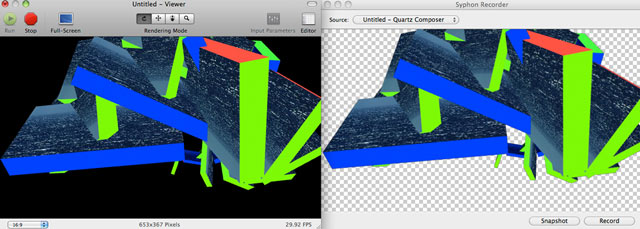
quartz composer dancing with syphon recorder and alpha channels

Warning: playing around long enough with 2D billboards and sprites (to display images) inside Quartz Composer, will eventually lead you to a third dimension. Fear not, inept explorers before you have survived, and they’ve even left some string at the edge of the cave:

Playing with 3D in QC

1. Create a new clear patch. This creates a blank background, choose colour in its inspector.
Type ‘clear’ into the library window, drag and drop a ‘clear’ patch onto your editor window.

2. Drag a ‘cube’ onto your window too.
Drag a movie from your hard-drive, into your window. Attach the image output to one of the image inputs of the cube.
Play with the rotation and x / y / z values of the cube in the inspector, and you should see video on one side of the cube.
( Tip – When adjusting Quartz parameters, adjust at 10 x speed by pressing shift at the same time, helpful for quicker compositing.)
You now have video playing on a 3D object in QC. Woo!

To easily put video on all surfaces – create an input splitter – by right clicking on the cube. Select ‘Insert input splitter’ and choose the the cube image input you’ve been using. Drag from the output of the input splitter, to as many of the cube image surfaces as you wish.

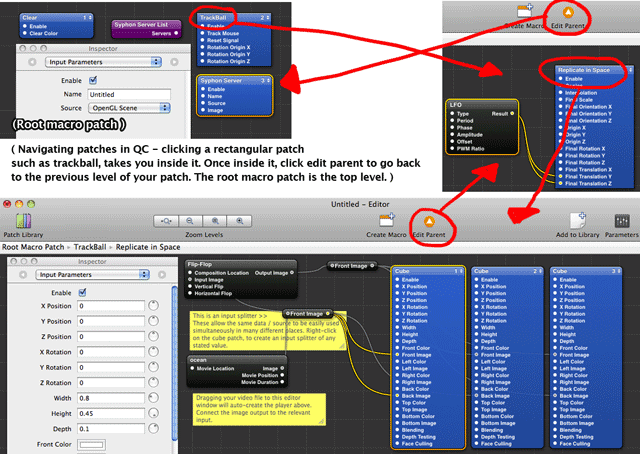
3. For easier 3D space manipulation try using a trackball. Drag one in from the library. Click and drag to select your cube(s) and movie files, then press command + x to cut them. Leave the clear patch. Double-click the Trackball patch to go within it. Paste (command + v) your cube here. Now try clicking and dragging on your QC viewer window – the trackball enables this more intuitive navigation / perspective alignment. (Click edit parent in the editor window to go back to your upper layer patches at any time.)

(Similarly, the 3D Transform patch can be used to allow easier control of 3D space. For example, placing several 3d objects inside a 3D transform, allows easy perspective adjustment of the whole scene by changing the 3D transform parameters.)

4. To add complexity – drag a ‘Replicate in Space’ patch from the library into your editor window, and place beside your cube. Again select your cube(s) + movie(s) + cut these. Double click to go inside the Replicate patch, then paste these inside. Play around with the Replicate parameters and watch the results.

quartz composer and 3d

3D experiment quartz patch ( Update the movie location to match a video file of yours, or delete the included movie link, and drag a movie into the editor)

Playing with your 3D QC file inside VDMX

Option 1: Drop it into the media bin and it should playback the 3D model with pre-connected movie.

Option 2: To use the QC file as an effect – allowing any clip being played in VDMX to appear on the cube – we need to do a few things :

– So that the video input is user defined rather than pre-defined, the root macro patch needs ‘an input splitter of type ‘image’ set up receive the incoming video stream‘.

– To enable any of the QC parameters to be adjusted live inside VDMX, we need to adjust the relevant parameters in the QC patch. This is called ‘publishing an input in quartz’ ( and enables that QC parameter to be adjusted within VDMX –  see instructions). However – slight complication – these need to be published in the topmost layer of quartz ( ie the root macro patch) to be accessible in VDMX. So if you’ve published an input within a subpatch of your main patch, this won’t show up in VDMX. To solve this, publish the input at the layer of QC you are in ( eg inside a replicate in space patch), then go up one level – this published input will now appear listed in that patch ( eg replicate in space). Repeat the process of right clicking to publish again, and it will appear in the next patch up, and so on until it appears in the root macro patch.

– Save the QC within your VDMX QC FX folder. Select it from assets ( if needed, refresh via VDMX > prefs > User paths ). Whatever VDMX clip is playing will now be composited onto the cubes. Dude! OH: and click-dragging in the VDMX preview window works for the trackball navigation, the same way it does within QC.

3D experiment quartz patch for VDMX  (Drop into VDMX QC folder. Change parameters in this QC patch, save as new name in the same QC FX folder, and you’ve got as many new 3D compositing tools as you want.)

Playing With 3D Models

Download and install Vade’s v002 Model Loader – which allows you to “load 35+ 3D model formats into Quartz Composer, including animation data.”

Drag the v002 model importer into your editor. For ‘model path’, enter the address of a 3D model. (Drag a 3D model to the editor, click it, select path in inspector, copy and paste into v002.)

Connect an image or video to the v002  Model Importer ‘image’ input, to texture your model.

Read the included notes for more fun – including models with embedded 3D animation parameters.

Recording Your QC Experiments

Install Syphon Recorder.
Install the Syphon for Quartz Composer plug-in.
Put ‘Syphon server’ into your toplevel Quartz editor window. To use the OpenGL scene as the source, set this patch to be the last (top) layer rendered. ( ie – click on the right of your syphon server box, and ensure it’s number is higher than other layer.) This enables the Quartz output to be displayed within Syphon Recorder.

Open ‘Syphon Recorder’. Your quartz video should be already visible. Adjust recording preferences to suit (it handles 1080P fine on this 3 year old macbookpro), and hit record. It seems to manage 1080P HD recordings fine, and it even records alpha channels ( ie you can record audio-responsive 3D models on a transparent background, for easy compositing later into the likes of After Effects.

(See also: QTZ Rendang – Free software for rendering out quartz patches. Potentially useful for non-real-time rendering out intensive patches that give slow playback. Haven’t tested that yet though.)

Special shout-outs:

– to Vade for providing both the v002 model importer, Syphon and the Syphon recorder, which makes a lot of the above possible.

– To VJ Shakinda ( co-author of a forthcoming book on QC with @momothemonster) for his trilogy of 3D tutorials on youtube, which really helped me get to grips with 3D in QC. If you found this stringy guide helpful, wait until you’re bungee jumping with this fella:


Above, 3d objects moving to music in 4 mins. Also tasty: 3d beat reactive scenes – part 1 / part 2 / part 3.

Previously on Breaking Bad:

Learning With Quartz Part 3: DIY Anchor Rotation FX for VDMX

Learning Quartz Composer Part 2

Learning Quartz Composer Part 1

by j p, April 16, 2012 0 comments