Millumin Review

millu-review

“Millumin manages video on stage for theaters, video mappings and interactive installations”

Millumin.com

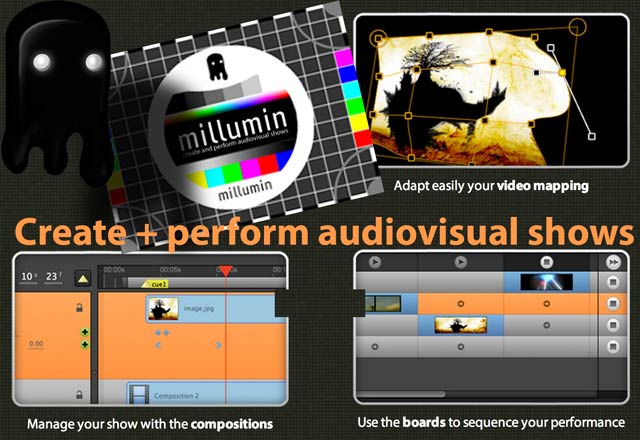
As real-time video software continues to evolve, we’re starting to see some really thoughtfully considered applications – such as Millumin, by Philippe Charaund, software dedicated to “create and perform audiovisual shows”. In part, Millumin is possible because of today’s easy re-routing of video between applications (thanks to software such as Syphon on mac and Spout on PC), which has enabled some developers to focus on specialty areas, and allowed others to provide ways of usefully integrating different parts of a video workflow.

Where does Millumin fit in?

While there are a lot of real-time video tools and specialities available, Millumin’s great strength is as over-arching software – and providing useful ways for co-ordinating and controlling other software ( eg triggering and manipulating clips inside VJ software, and recompositing, mapping and sequencing that video with Millumin, easily jumping between very complex compositions).

Millumin will especially be of interest to those seeking to sync media in tightly curated shows eg syncing video with important theatrical cues, conference cues, or a specific sequence of events in a music show. Aside from the time-based controls, it’s also a pretty effective piece of mapping software – which includes a built in capacity to edge blend between projectors.

In other words, Millumin provides good control over time (sequencing) and space ( compositing and mapping). It’s a unique recipe – while there are other apps that offer more advanced portions of what Millumin does – eg Vezer‘s sequencing and timeline options, or Madmapper‘s mapping controls – there’s nothing else that quite manages to do what Millumin does.  QLab is probably it’s closest competitor, with the strengths and weaknesses of each meaning one or the other will suit your workflow better.

Millumin’s Workflow? 

From their site guide:
1. Drag-and-drop files from Finder to the Dashboard, and click on the cells to play them
2. Use the Workspace toolbar to move, map, warp, mask … to rotate and scale the layers directly in the workspace.
3. Change blend mode, add effects, transitions and more from the Properties Panel
4. In the Library, manage your files, Syphon servers and inputs
5. Create a Composition, then organize your media in time with keyframes
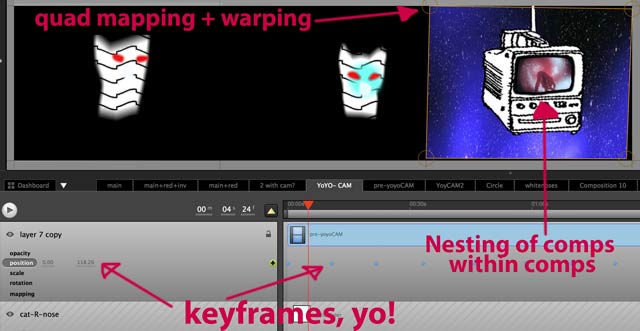
– includes ability to play compositions within compositions ( like nested compositions in After Effects)
– Also like AE – includes adjustible keyframes – change opacity, position, scale or rotation change over time to specific values.
– cue points can be added.
– pause on cue points
6. Import this Composition into the Dashboard + switch between complex compositions easily.
7. The Magic Key is [SHIFT] : maintain it to multi-select and snap items

Features?

Control of time / sequencing: Millumin’s key-framable timelines will be warmly familiar to everyone who has used video editing software, and tends to find such functions missing within VJ software. Most VJ software will show a timeline / playhead for each clip – but much more rare is a capacity to place many clips along a timeline, and easily add cue points, and easy linear arrangements. Example nice touch? Drag and drop a clip onto a timeline, then drag the end of it to auto-loop as long as you need.
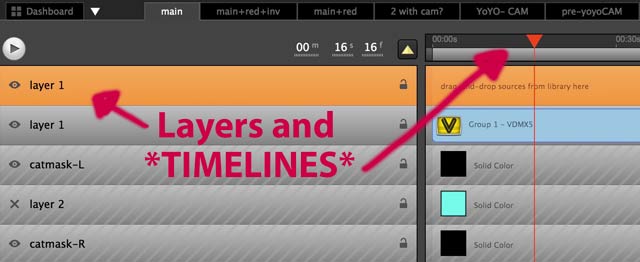
millu-layerstimelines

millu-mappingnesting

Room for improvement? There are lots of little user interface quirks that could be removed / better designed. Admittedly this is partly because Millumin reminds so much of video editing and compositing software – which brings a whole bunch of fine-tuned expectations – and sets an unfair benchmark – relatively new software made by one person could hardly be expected to match the resources and foundations of established editing and compositing software.

Control of space / compositing:

Video compositors will find it a pleasure to be able to create complex compositions, and nest and even animate these comps within other comps. In this respect Millumin is the closest thing to a real-time After Effects that exists. Sequencing and switching between various comps is trivial to implement…
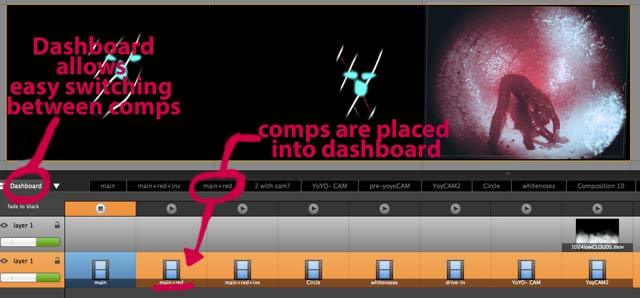
millu-dashboard

.. and these ‘presets’ / ‘dashboard selections’ – can be triggered from other software using midi or OSC – eg the M1-m10 presets built into a VDMX control surface window below.
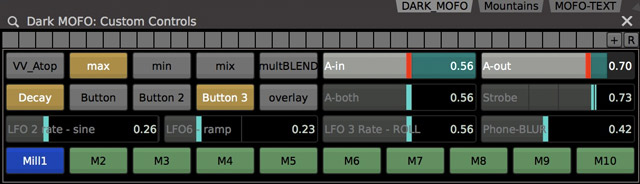
millu-via-vdmx

Millumin can also take in as many syphon inputs as can be thrown at it – which integrates it well with VDMX’s capacity to send out many. All of these can be composited differently in Millumin’s compositions, allowing for a huge amount of flexibility and convenience. (Snap below includes sequined ninja in oyster cave footage used at recent Dark Faux Mo festival in Hobart.)
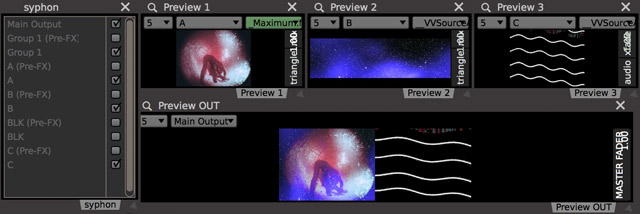
vdmx-to-millu-via-syphon

Control of space / mapping:  

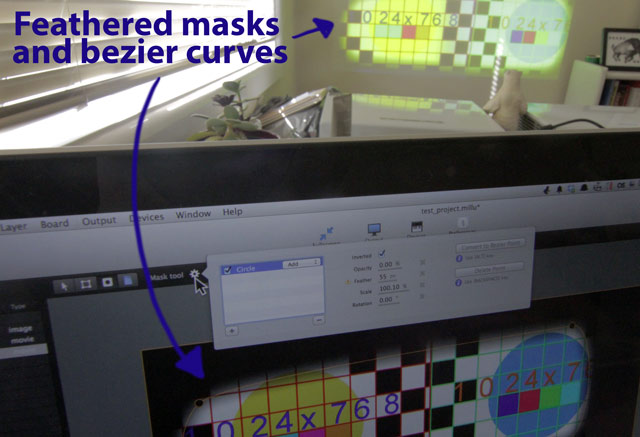
Millumin features great controls for multiple outputs, and features multi-screen edge blending and feathering of masks:
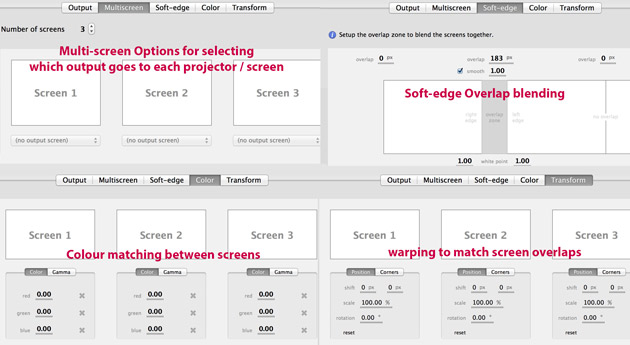
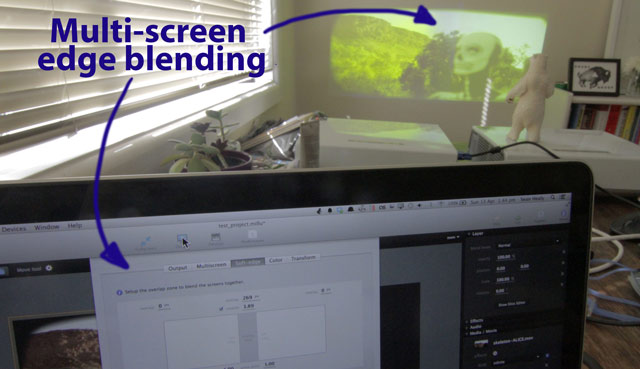
millu-blending3

millu-edgeblend

millu-mask

Room for improvement? Being able to work better with multiple projectors that have different aspect ratios to each other.

Visual Effects?

As a standalone application, Millumin has a limited range of visual effects. On the other hand –  deep syphon integration means easy piping in of video from other software, for sequencing or compositing, and quartz composer integration means being able to easily add customised QC elements, effects and compositions to any of that video piped in.

Requirements:
– Mac OSX 10.6 or later. (PC version in the pipeline)

– 599€ (VAT not included) = A license for Millumin on 2 different computers. for 2 computers . Educational and rental pricing available by negotiation.

Verdict:
Millumin is very thoughtfully crafted software, with a nicely expanding feature set. And while it’s missing refinement or lacking more detailed control in a few places, it continues to develop and evolve into a fantastic and versatile tool for live video, especially with multi-screen compositing.

Other Millumin Resources: 

Millumin Tutorials:

Realtime Videomapping with After Effects
MilluPlug, collaborate with everything
Split a Layer
Compositions & Cue points
Dynamic Mask with a Matte
Kinect Mask
Mapping & Warping
Mapping Keyframes
Mask & Fill layer
Custom effect with Quartz Composer
Render compositions to MOV files
Processing, Syphon & OSC
Control Millumin with TouchOSC (on iPhone or iPad)
Edge blending with Matrox DualHead
Audio routing with Ableton Live
and lots of examples showing how to take VJ software into Millumin..

Millumin discussion forum

Millumin feature suggestionbox

Special shout outs to

– Lotech (NZ) for inspirational use of Millumin @ Splore – each VJ could send a signal into the machine running Millumin, which effectively let them play on a pre-mapped structure, and for ongoing feedback about Millumin over time.

– Jem the Misfit (NZ/Aus/Ger) – for highlighting how creatively Millumin could be used for compositing.

by j p, July 2, 2014 0 comments

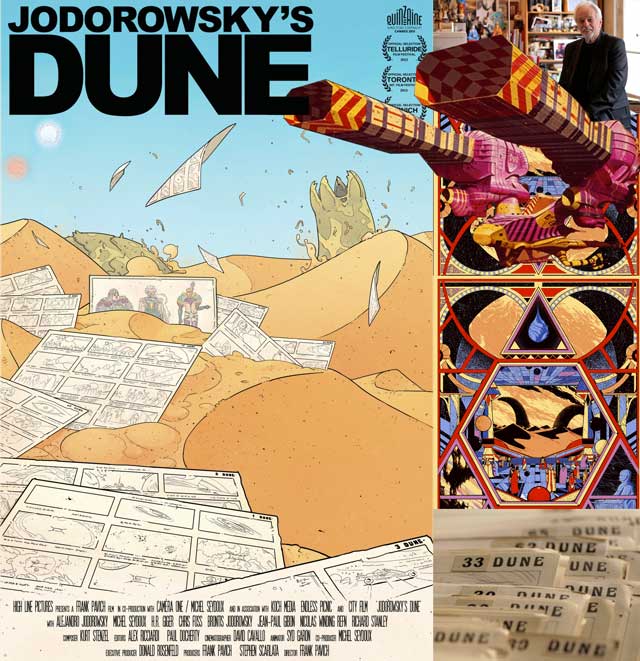
Jodorowsky’s Dune

jodorowsky-dune

LOGLINE: The story of legendary cult film director Alejandro Jodorowsky’s staggeringly ambitious but ultimately doomed film adaptation of the seminal science fiction novel DUNE.

SYNOPSIS: In 1974, Chilean director Alejandro Jodorowsky, whose films EL TOPO and THE HOLY MOUNTAIN launched and ultimately defined the midnight movie phenomenon, began work on his most ambitious project yet. Starring his own 12 year old son Brontis alongside Orson Welles, Mick Jagger, David Carradine and Salvador Dali, featuring music by Pink Floyd and art by some of the most provocative talents of the era, including H.R. Giger and Jean ‘Mœbius’ Giraud, Jodorowsky’s adaptation of Frank Herbert’s classic sci-fi novel DUNE was poised to change cinema forever.

“For me, Dune will be the coming of a god. I wanted to make something sacred, free, with new perspective. Open the mind!”
– Alejandro Jodorowsky

Finally got to see Jodorowsky’s Dune recently (with long-time fan, and comic-book genius, Gregory Mackay, who is is great for detailing the sordid history of sci-fi illustration). It’s an incredible story of an incredibly audacious and film…. and although that feature never got completed, the documentary shows how lots of the creative energy involved was rewarded elsewhere later.

Jodorowsky’s Dune – plays at the Melbourne Film Festival in July 2014.

Backgrounder?

Alejandro Jodorowsky : “I ask of film what most North Americans ask of psychedelic drugs. The difference being that when one creates a psychedelic film, he need not create a film that shows the visions of a person who has taken a pill; rather, he needs to manufacture the pill.”

El Topo – a metaphysical western.. ( see also, ‘acid western’ ), catapulting Jodorowsky into the cult director spotlight…

Holy Mountain – another quest for enlightenment, with vast and ambitious set designs… thanks to an increased budget of $1million from a Beatles business associate (John Lennon was a huge fan of El Topo).

Following the success and acclaim for Holy Mountain… his next wish was to adapt Frank Herbert’s Dune, as a psychedelic space opera, a spiritual film for transformation…  And in 1974 French producer Michel Seydoux offered to finance the start of it.

Amongst the formidable artistic army gathered to make Dune :

So the world’s greatest ‘psychedelic space opera’ never got made…  but director Frank Pavich did a great job of teasing out the possibilities, ably assisted by the subtle storyboard animations of Syd Garon (director and animator of Wave Twisters, yo!). More importantly though, the director was able to reunite producer Seydoux with Jodorowsky (after 30 years!), and Seydoux not only co-produced Jodorowsky’s Dune, but also went on to produce Jodorowsky’s first film in over 20 years: Dance of Reality (another incredible film!).

by j p, May 27, 2014 0 comments

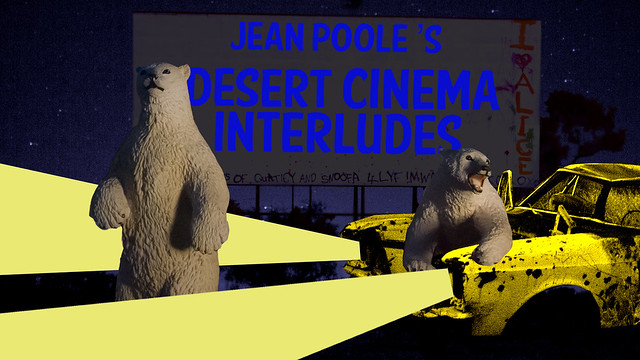
Desert Cinema Interludes @ WOS 2014

Coming soon to WIDE OPEN SPACES, MAY 2-4, ALICE SPRINGS, 2014.

A series of short live cinema interludes – (5-10 minutes each & performed during band changes, twice per night on Friday, Saturday and Sun.)

Each live cinema piece will explore footage and soundscapes from one particular landscape, juxtaposed with a range of audio-reactive animated characters and objects, mixed and mutated live.

Float briefly in the ambience of luscious forests, lunar-like New Zealand volcanoes, underwater coastal life, and the desert (from footage shot during WoS 2013).

(See also: Pattern Machine AV performance @ WOS 2012, Desert Engines AV performance @ WOS 2013 (with Suckafish P Jones)

by j p, March 27, 2014 0 comments

March 1: VDMX Masterclass @ ACMI with David Lublin, Vidvox, NY

DavidLublinstream
Am delighted to be helping host an ACMI workshop on March 1st – with David Lublin (Vidvox co-developer for VDMX).

((UPDATE: video workshop was archived on youtube, and is viewable at the bottom of this page))

David will be delivering the workshop from New York, with high bandwidth streams of both a video-conferencing computer and his VDMX video output for workshop attendees to view. ACMI will be providing laptops with VDMX pre-installed, although people are welcome to bring their own.

This is an incredible opportunity to hear about VDMX from a core developer, and get inside knowledge about real-time video manipulation.

Tickets are limited for the workshop, +pitched at a video-artist friendly $25. Book via ACMI.

(Drop a line if they sell out, we can reserve you a spot if you bring your own laptop.)

The workshop will also be youtube streamed and later archived online (See link at bottom of page):
acmi-stream

Comments can be left by online viewers, and there will be a dedicated section at the end, where online questions will be answered by David.

VDMX WORKSHOP WITH DAVID LUBLIN: 12-3PM, Sat March 1st
(12-3PM A.E.S.T. – online viewers, check your time difference)

12-12.30  Introductions / background
12.30-2 “Video fundamentals taught with VDMX” – by David Lublin (via NY)
2-2.30 Questions + Answers / with workshop attendees + questions from online viewers.
2.30-3 Workshop discussions / experiments / troubleshooting /feedback

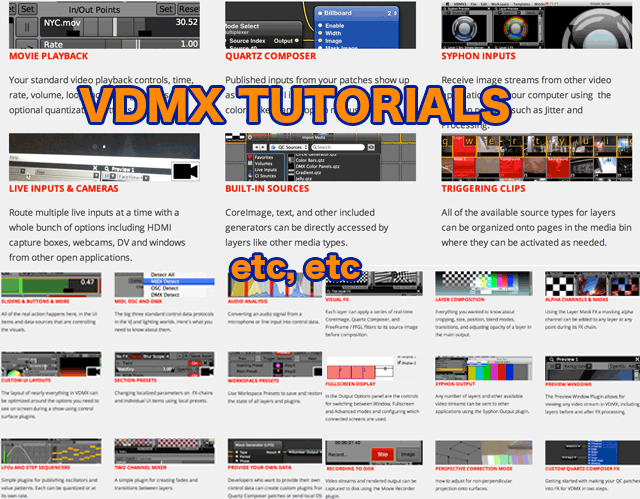
Pre-workshop advice: have a browse through the extensive range of VDMX tutorials that’ve been published in the last 6 months, there’s a real wealth of VDMX knowledge available: introductory tutorials, arranged by topic // and a full list of tutorials including lots of novel uses and recent enhancements. See also: VDMX developer blog / VDMX online forums.

VDMX_tutorials

Bonus Round: Check out  David’s midi dogs + game of phones).

The Archived Video
See below – or click here to view in youtube, and read the comments contributed by the 50+ concurrent viewers.

by j p, February 6, 2014 1 Comment

Boinga Bob’s Temple in Warburton

boinga-bob-medley

- Photos from Boinga-Bob's Temple.

Scattermish and myself recently tackled the Lilydale to Warburton rail trail,  a 40km stretch of bushland cycling, an hour outside of Melbourne.

Rail trails are shared-use paths recycled from abandoned railway corridors. Rail trails link big and small country towns and meander through scenic countryside just as railways did in the past.. Railway engines have always had difficulty climbing hills. The steepest grade of a railway line is never more than 1 in 30.. no sharp rises and no sharp bends, just sweeping curves and gentle undulations.. abandoned rail lines make superb pathways for walking and riding.” – Rail Trails Australia.

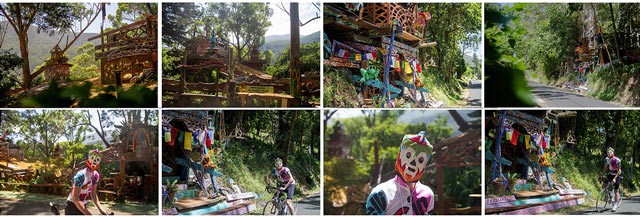
The ride itself is awesome – it’s a gorgeous, mostly tree-shaded ride, with plenty of great views, though Warburton has no station, so you need to plan for an 80km round trip from Lilydale. The Warburton end makes it all worthwhile – with the cute bicycle themed Cog Bike Cafe greeting riders at the end of the ride, and just nearby… jutting out from the trailside foliage – the temple of Boinga Bob, a sprawling marvel of DIY architecture and evolving artwork installations.  I’ll let the temple photos speak for themselves.

Boinga Bob was home at the time, and is quite the interesting character. He happily entertained a few guests with tales of his extensive adventures on various islands and mountain tops over the years. Currently though, he is facing a battle with the local council who want to destroy his temple. Drop him a line if interested in helping, or join the Facebook group to save Boinga Bob’s temple.

Below, a 5 minute interview with Bob about his temple:

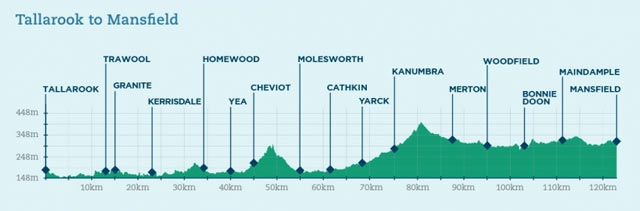
Next up: The Great Victorian Bike Trail.

great-vic-rail-trail

by j p, February 2, 2014 0 comments