Time Lapsing

madskeleton_oldmanKRUMPer

A quick guide to using photographs for making time lapse movies (or rubbery timed stop motion animations).

Nutshelly
Sequence 24, 25 or 30 ( for film / PAL / ntsc ) photographs after one another, and you’ve got yourself a one second movie. Stitching these photos together can be as easy as naming the files sequentially, keeping them in a folder, and then opening them with Quicktime Pro on mac or PC. Choose File > Open Image Sequence, then select the first image within the folder, choose the frame rate when the option appears, and then Quicktime will open all of the images as a playable movie. You can also do this within most animation and video editing software, and even from within photoshop, but the quicktime method is most painless, given the often huge number of photos involved.

For those who like shooting RAW (here’s why you should), After Effects unfortunately can’t process RAW files directly, but Creative COW shows you how to import a .jpeg or .tiff sequence into Adobe After Effects with Adobe Camera Raw development settings applied. Regardless of which method you choose, the high resolution of many photographic cameras means using photographs to create a time lapse can deliver a much higher resolution movie than most video cameras are capable of. Fun times ahead.

Timing Your Photographs
An intervalometer is a cheap device ( from $30 on bay + amazon, which effectively mimic more expensive options that can run into the hundreds ), that allows cameras to be programmed to open their shutters at timed intervals (or you can make your own). Experiment with different time, exposure and shutter settings to see the results they give.

Learn from the BBC Nature Dept.
Who better to trust on a time lapse tutorial, than someone from the BBC documentary division? Some take away tips from a lengthy and insightful post on DIY time lapsing by Timothy Allen:

1. Use manual settings on your camera
2. Set your ISO to its lowest if shooting in daylight without ND filters
3. Solid tripod = no camera movement
4. Longer shutter speed = more realistic movement (up to a point)
5. Set your interval according to how fast you want the action to move
6. Check that your memory card has sufficient free space for your images
7. Make sure you have enough battery power to last the duration of shooting.

The whole article is worth reading for more detailed insights into exposure, reducing flicker, equipment tips and how to approach panning time lapses – with a link to a particularly mind boggling behind the scenes video from the BBC’s Life documentary.

Volcanic Time Lapses
Sean Stiegemeier’s time lapse of the recent Icelandic volcanoes, utilises a motorised dolly to provide a graceful and awe inspiring look at the spewing ash clouds ( and nice soundtrack from Iceland native, Jonsi of Sigur Ros).

HDR Time Lapses
And then there’s HDR time-lapse techniques. High dynamic range imaging involves taking three separate photos at separate exposure values then combining the highlights, midtones and shadows of these into one image. HDR time lapse video then requires three sets of photos to be first combined, and then imported as sequence.

Also worth a look? dragonstopmotion.com, a “premier capture software for stop-motion animation, motion design and visual effects,” with quite a range of features, including direct control of Canon + Nikon DSLRs.

[[ Previous DLSR related posts: stabilisation and steadicams, an introduction to DSLRs, macro photography and video and a Canon7D review ]]

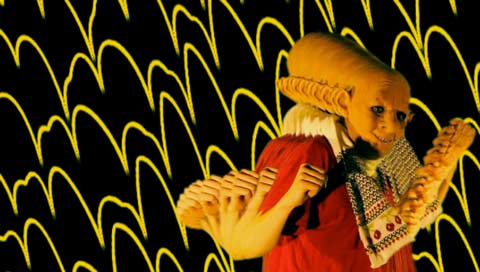
{{{{ And no, the image up top isn’t a time lapse, but a video still from some experiments with the ‘time echo’ effect. For time lapse purists, just imagine a series of fluffy clouds rolling in over the horizon, behind the old man krumping… }}}}

by Sean Healy, September 7, 2010 0 comments
Full Domed Cinema

Lying nearly horizontal, managed to catch some 180 degree immersive films recently, at the Melbourne Planetarium as part of MIFF.

Under The Dome
The Melbourne Planetarium (at the Scienceworks Museum in Spotswood) features a ’16m domed ceiling, reclining seats, a stereo surround sound system and has recently been upgraded to incorporate Sky-Skan’s DigitalSky projection system’. In practice, this means craning your neck around everywhere to see what’s happening beyond your peripheral vision. MIFF featured 3 compilations of dome films, and I opted for the experimental collection – which could’ve been called screensaver collection and only a couple of films would’ve suffered by that description.

Domefest / Elumenati
Part of the compilation came from Domefest, an annual screening curated by Artslab, an interdisciplinary arts centre in the New Mexico desert. A big of googling reveals that festival to be connected with another group, Elumenati, virtuoso specialists in the field immersive projection design. Which also happens to be a group that Johnny De Kam ( founder of VDMX and vidvox.net ) has done a lot of work with. Small world dome thingy.

Anyways, best film of the evening? Celestial Mechanics by Scott Hessels (2005), which aimed to visualise the manmade aerial technologies between us and the heavens, starting from police and news helicopters, and working through a range of transmitters and satellites, beautifully evoking their processes as it unfolded. Less good? Cosmic Dance, self-described as ‘astrophysics meets Bollywood’, and a painful 48 minutes of a patronising female host, who when not speaking down to the audience, was being washed in cliched special effects and dancing with the universe. Or something.

DIY DOMING
“DomeXF is a content plug-in for Adobe After Effects, Windows version. For fulldome producers, it is a key tool for transforming flat-screen content to the dome. The DomeXF plug-in for Adobe After Effects is available from Sky-Skan for $395USD”.

DomeXF offers the three standard Full Dome video transformations: standard, panoramic and fisheye.
• Standard transformations give the artist the ability to represent true geometry on the dome allowing the composite layer to appear flat and undistorted.
• Panoramic transformations force the bottom of the composite layer to align with the horizon, even when resized.
• Fisheye transformations give the composite layer depth, akin to the traditional all-sky transformation.

And a vast array of potential filming and projection transformative possibilities await you at Paul Bourke’s site of maths and video surfaces.

Fulldome ANAT Masterclass Opportunity
Dome Lab 2010 wants you, applications due Friday 3 September 2010, masterclass to be held 31 October – 5 November 2010 :: Perth, Australia.

“… most fulldome content to date has been educational and comprised of computer-generated animation, data visualistion, or a combination of both. Now, however, there is a shifting focus, with producers turning their sights to the entertainment potential of live-action story-telling for large-formats such as fulldome. Dome Lab is a world-leading intensive workshop investigating this potential and the specific challenges involved in creating compelling live-action narrative content for large format and frameless screens.

Filmmakers and artists excited by the chance to leap beyond the frame and into the expansive creative potential of large-format, immersive screen experiences are invited to apply. Participants will work alongside a team of creative and technical luminaries including Academy-Award winner, Ben Shedd, 2010 Peter Rasmussen award-winner, Peter Morse and international fulldome pioneer, Hue Walker Bumgarner-Kirby.”

by Sean Healy, August 21, 2010 0 comments

Ten Technologies to Fix Energy And Climate

Unimpressed by the climate policies on offer for Australia’s upcoming election? You need to read Chris Goodall’s book with the above title. The Executive Summary? Shifting from the ‘shackles of fossil fuel dependence’ to a low-carbon economy, is just like the transition from VHS to DVD. Kind-of.

To Be Specific
Chris actually notes at the book’s beginning, the transition away from fossil fuels should never be expected to be anything but immensely difficult, nothing at all like shifting from VHS to DVD. The last century of industrialised oil burning has an enormous infrastructure built up around it, and it will take a long, long time before we are able to shift away from it. That said, he does manage to paint a compelling picture of how we could successfully combine new technologies and a variety of energy reduction initiatives. That anyone can write a book in this arena, and come off sounding even vaguely optimistic, is commendable in itself.

Recommended Tech
The list can probably be guessed, but Goodall’s skill is in usefully framing the technologies and the problems surrounding their more widespread implementation, while noting realistic limits and expectations. Wind and solar take up the first two chapters, and while success stories are pointed to ( Denmark gathers 20% of it’s electricity from the wind, concentrated solar power techniques are improving energy gains using more accessible technologies than photovoltaics), he also mentions that even in a best case scenario they will still supplement rather than replace fossil fuels.

More Energies
From where else? The ocean ( tides, waves, currents, temperature differences ). From our homes ( fuel cells, and micro generators of power that allow us to harness the heat too, instead of losing most of it at power plants ). From savings within super-efficient homes and electric cars. Motor fuels from cellulose – which means land battles ahoy ( 600 million cars competing for the food needs of 6.6 billion people), though potentially combined with carbon sequestering ( burying carbon ) in ways that both improve soil and food yields, as well as reduce carbon footprints. Reforestation gets a shout out too, for the potential to soak up carbon.

M.I.A.?
Goodall explains in his epilogue why he didn’t include nuclear power stations (bad economics), geoengineering ( need to research but not prioritise now )and energy efficiency ( not really a technology ) in his list of technologies, and manages to end on a note of optimism.

See also: Carbon Commentary, a site run by Chris aiming to be ‘a critical appraisal of issues in a move to a low-carbon economy’.

by Sean Healy, August 20, 2010 0 comments

Macro Photography And Video

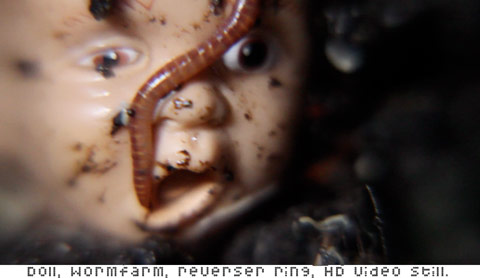
wormfarmy
DSLR cameras extend the possibilities of macro (close-up) photography to video. Aside from the expensive macro lens options, there are a range of super-cheap DIY modifications available, that let you capture miniature worlds in motion.

All below are cheap options, and can be frowned upon by photography purists – you’ll lose some of your camera controls ( eg autofocus), but when used for DSLR video, image quality is still fantastic compared to traditional video cameras in the same price range, and really, you’re swimming in miniature worlds, and potentially capturing them in HD video.

Macro Conversion Lenses
Option one – find out what diameter size your lense is ( it’ll look like this on the lens – Ø72, meaning 72mm ), then buy a cheap lens add on magnifier of the same diameter that will screw on. An Ebay search for ‘macro lens kit’ will deliver a cheap collection of lenses with a variety of magnifications.

Reverser Rings
Again, the diameter of your lens is needed her, and when you flush the reverser ring search through Ebay, a small package will arrive from Hong Kong in a week or so. The reverser ring attaches to the front of the lense, which let’s the lens go onto the camera backwards. (Or DIY Reverser ring )

Extender Tubes
These cheap metal cylinders extend the distance your camera’s innards and the end of the lense, enabling a closer minimal focal distance for shooting from.

Bellows
There’s something perversely analogue and satisfying about these, kind of like attaching a small piano accordion to your digital pixel capture magic box. They allow easy fine tuned adjustments, moving the lens with respect to the focal plane for focusing. ( Crazier, more expensive tilt-shift bellows option, with full Canon EOS controls retained by camera: Novoflex have you covered.)

Or You Could Just Use
A Pringles can. And aye, naturally, there are many DIY iphone macro photography tutorials ( eg Instructables ). Mostly they involve magnifying glasses of some sort in front of the camera lense. Or maybe a video endoscope‘s more your flavour?

Challenges?
Depth of field will be a problem. Even very, very small movements with the camera will take objects in and out of focus. Stability is key then, and DIY stages / environments for objects, even better. Lighting can also be a problem, both in terms of having the camera so close to the object, and with the extra lense lengths being added, letting less light through to the camera. This can be solved with ring lights which fit around a lens, or thoughtful side lighting / reflected light.

Be off swimming with the micro-beasties now, won’t you?

by Sean Healy, August 19, 2010 1 Comment

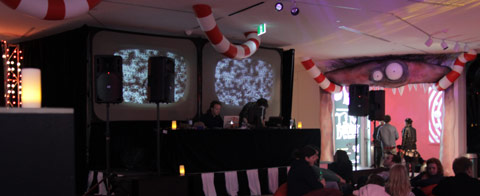
Remixing Tim Burton

burtonclub_live03web

In an alternate universe you have been asked to do some live remixing of Tim Burton related films. However, in that universe, inter-universe messaging systems are commonplace, and your alternate self received the following, hopefully helpful note about possible films to sample.

Take Me Back To Wonderland
Congratulations on your assignment, you are going to have fun – there’s plenty of room to move here, from the whimsy of Pee Wee Herman’s Big Adventure through to much more macabre and grotesque cinema. And this little known fact should help: Bit Torrent works the same in all known universes.

Alice in Wonderland is a great place to start digging. Try the Ravi Shankar soundtrack soaked 1966 BBC production (one of the most psychologically engaging Alice films), with Sir John Gielgud and Peter Sellers. And there are twenty or so other versions, but Jan Svankmajer’s stop motion Alice packs more invention than most. His short film Ossuary, about visiting a cathedral of bones will cross-edit nicely too.

If you lived in a universe where Prince wasn’t a newly religious recluse who complained about the internet killing culture, you’d probably find the combination of his Batdance music video ( half joker face, half batface, 80’s music video aesthetics representing) and the unaired pilot episode of Batgirl irresistible. Especially say, when paired with matching shots of his purpleness on the rain era motorbike, and Batgirl swaying on her batbike in front of a green screen, while a presumably expensive blow-drier makes like wind with her hair.

Hit Tim Shiel / Faux Pas up ( iamfauxpas.com = alternaverse friendly) for some Major Beetle Juicy Lazer file transfers. Sadly, Tim is unavailable in other universes for live soundtracking and sonic manipulation of video clips, but if you’ve got the bandwidth, he’ll bring the Day-O / Beetlejuice dinner / remix party – with Harry Belafonte and the muppets, karaoke dreamers, ableton live splinter video cut-ups, and a Major Lazer infused Day-O for dessert.

Tim will also remind that Janelle Mondae’s ‘Wondaland’ is great accompaniment for Alice’s rabbithole comedown. He’ll also likely recommend a deluxe edit of Janelle Mondae’s The Archandroid album – “delete tracks 9, 10, 11, 18 and try again – another bloated over-ambitious r&b/futurefunk record saved by some judicious editing. 78 mins of blah becomes 47 mins of pure gold!”

In your universe, Ed Wood wears budgie smugglers and complains about boat people refugees while he directs films – and the Political Opposition leader of your country, Tony Abott, slinks about Parliament after hours in a blouse and skirt, with matching stockings and heels. Work with that.

In this universe, The Tim Burton exhibition runs until Oct 10 at ACMI, Melbourne.

by Sean Healy, August 11, 2010 2 Comments