Laser Cut Vidi-yo + Madmapper Test

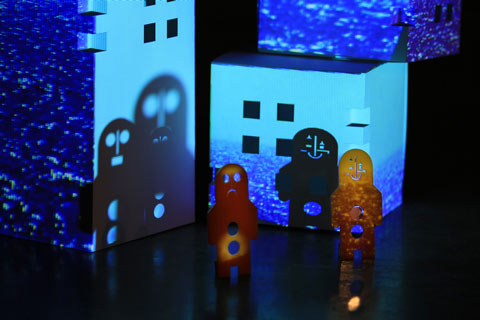
Have been doing some experiments recently with Troy Innocent, involving laser cut characters, everyday scenes and projection mapped video. We’re trying to figure out what works well for us, with an eye to fleshing out something some kind of developed work later. Troy has access to a laser cutter at work, and obviously the attraction there is to play with the unique levels of intricacy that a laser cutter allows with materials such as plastic and thin plywood. Taking that a step further, we thought it’d be fun to develop some simple low frame animation loops with these physical characters and record them moving about in stop motion. We’ve done some simple tests outdoors which worked well, surprisingly popping to life when played in sequence onscreen, and most recently we tried an indoor shoot, which gave another chance to test out Madmapper.

Re-Routing Video in 2011

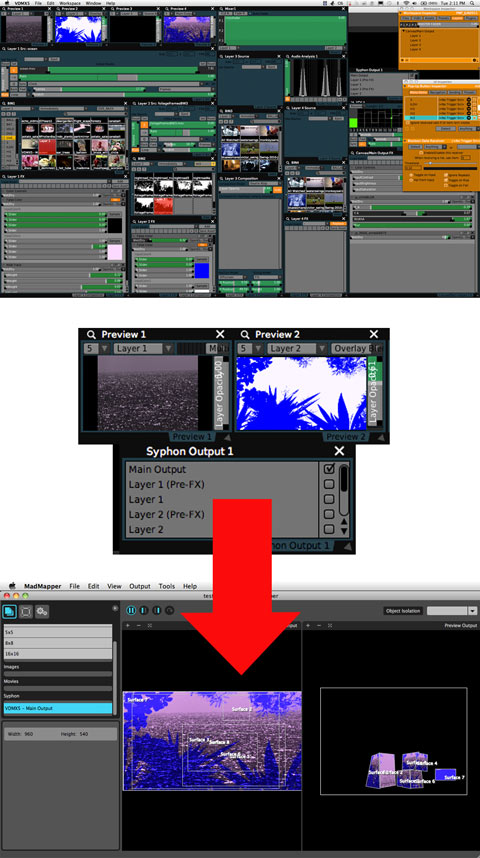
First up, the whole routing video clips between video applications thing, enabled by Syphon, is really fantastic. For me, this means VDMX to Syphon to Madmapper to the projector. Manipulate video in your preferred real-time software, then at the end of the chain remap this video onto what Madmapper calls ‘surfaces’, creating, positioning and reshaping as many of these surfaces as you like. This makes sense and so far the addition of running Syphon + Madmapper alongside VDMX hasn’t seemed to dent the performance of VDMX at all. That might change with more complicated projection mapping – we’ll see.

Some Madmapper Observations

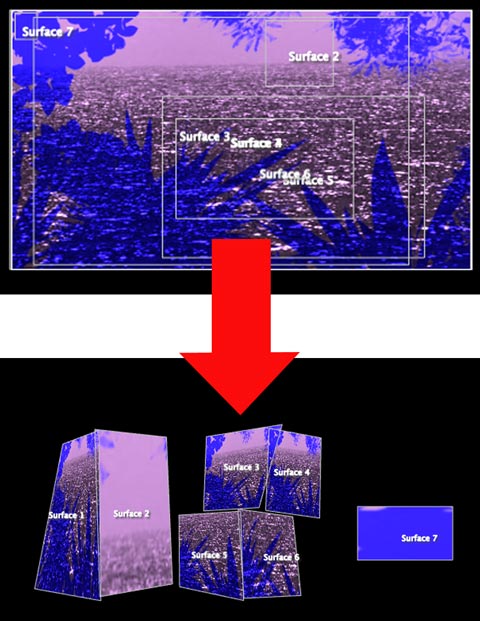
As seen above, the Madmapper interface is minimal and intuitive, and this helps mapping happen super quickly. For our test mapping onto some paper skyscrapers, it was a simple process of selecting which part of the video to be sent to a surface, then clickdragging the corners of the virtual surface until it the video filled the actual surface of the paper skyscraper in front of the projector. Total time to line-up video on the sides of 3 buildings? About 5 minutes. This is a very simple example, and possible with other existing software – but this software certainly makes the process a breeze. Am going to post a full review of Madmapper soon, and discuss some of it’s strengths and weaknesses for dealing with more complex scenarios. In the meantime, it’s worth noting that although it’s pitched as a solution for reconfiguring 2D imagery onto 3D shapes – Madmapper’s ease of use also makes it a very attractive option for just even compositing imagery within 2D environments. From the close-up below it should be evident how straight forward it is to select portions of video, and quickly composite this into desired shapes.  More laters!

by Sean Healy, July 5, 2011 0 comments

Pattern Machine @ Cockatoo Island, Sydney, July 16


Wassup, winter-villain?

Now that I’ve finished marking all of the respective assignments from classes at RMIT and Swinburne, am looking forward to biting properly into a few long neglected creative projects / overloaded bookshelves / learning curves etc. And that overdue skynoise overhaul so it better reflects the 2011 web and myself. Next up though, a video island adventure in Sydney harbour.

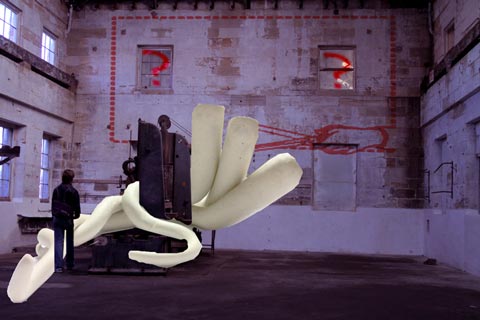
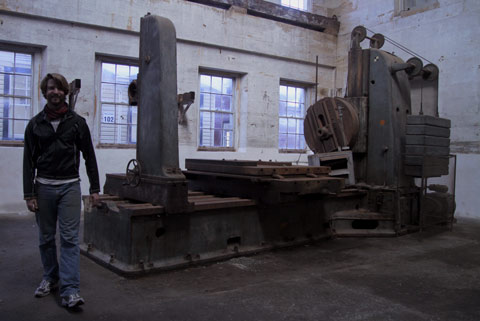
As part of the 2011 Underbelly Arts festival, I will be creating video projections to accompany long time audio wizard collaborator Dan MacKinlay, James ‘Dubtable’ Nichols ( that’s him in the photo), and Sarah Harvie whose specialty is inflatable sculptures! We’ll be doing this as ‘Pattern Machine’ in the space photographed above, which is one of the ancient ship building rooms at Cockatoo Island in Sydney Harbour. Pattern Machine has a tumblr and a twitter account, where we’ll be documenting our preparations and experiments, and also has a festival page, alongside all the other festival artists.

This year’s festival was pitched as an island residency for developing some works in progress. Looks like it’ll be quite an interesting collection of projects, with many artists practicing / building / tinkering on site in public view, followed by a performance  and exhibition day on July 16th, showcasing what has been explored during the residency.

For our part, the work in progress will mean explorations into location sampling and weird algorithimic audio with Super-Collider (eg “New No New Age Advanced Ambient Markov Music Machine” and attempts to intertwine inflatable tendrils around the machine relic within our inherited room. Pixel-wise – I’m hoping to do some projection mapping experiments onto that machine relic, re-animating it as it were, in real-time response to the sounds happening, and similarly try to create some kind of responsive visual designs on the inflatable structures. Aside from that, I’ll also be testing out a triple screen external graphics card ( matrox triple head 2 go ) to experiment with simultaneously projecting various scenes onto the wall behind the machine and inflatable sculpture. For the scenes projected on the wall, will be playing with some simple responsive graphics and some filmed / composed sequences of various events / stop motion / locations from around the island. My tools of choice : VDMX + Quartz Composer, with Madmapper for the projection mapping (Madmapper review coming soon).

Below, James and The Machine, moustache not to scale:

by Sean Healy, June 27, 2011 0 comments

Live Remixing: Chris Cunningham Vs Yo Gabba Gabba At The Sydney Opera House

June 5th, 2011.

Due to a weird Sydney Opera House ticket mix up – I ended up at YO GABBA GABBA live this weekend – instead of the planned pilgrimage to Chris Cunningham’s triple screen live cinema assault. Priceless. Etc etc

More laters…

by Sean Healy, June 6, 2011 0 comments

Learning With Quartz Part 3: DIY Anchor Rotation FX for VDMX

Aka ‘The Continued Adventures of Someone From Video Compositing Land Trying To Get By Inside The Quartz Kingdom’…

Earlier Quartz Wrestling delivered a splitscreen effect which took any clip playing in VDMX, and replicated it 9 times to provide something like a video-wall. It also customised a few of the Quartz based VDMX transitions, and identified a new range of problems when creating in Quartz. After some more noodling, and helpful tips from both Dan Winckler and Joris de Jong (hybridvisuals.nl), I managed to solve some of these problems, and custom build an effect I’d wanted (attached below).

1. How to select a custom anchor point in Quartz, for rotating an image or video?
The idea here was to be able to generate rotations from a corner, or from create arcs of rotation, with the rotation centre being far below the image. None of the various Quartz patches I could find seemed to have an ability to adjust an anchor point.

The solution? “Reposition the clip so what you’d like to be the anchor point is in the center of the screen, then place it inside a 3D transformation patch, and use the rotation Z property of that patch to rotate it.” (via Joris)

Understanding three dimensional space is best done when you have at least a slithery grasp of 2D first, and it took me a while to figure out why the width of a quartz patch always seemed to fill the screen when it had a value of 2.

Welcome to the Quartz Composer coordinate system:
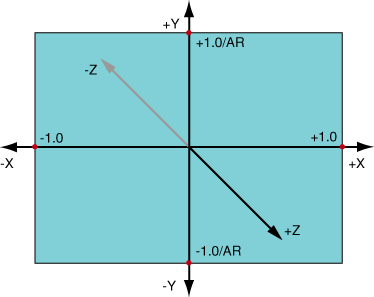
The Quartz Composer coordinate system

The width of a Quartz Screen is always 2, because Quartz treats the centre as 0, and gives the left and right borders of the screen the coordinates of  –1.0 and +1.0. The coordinates of the top and bottom borders depend on the screen aspect ratio (AR). In the case of a 4:3 aspect ratio, the values at the borders are +1.0 / AR = +0.75 and –1.0 / AR = –0.75. ( From the Quartz Guide written by Apple’s basement dwelling engineers. See also: Quartz Composer User Guide (PDF))

Ok. So rotating a video and changing the anchor point.

The 3D transform patch that Joris suggested placing the clip inside, is a macro patch (which in Quartz have square borders, unlike the rounded corners of most patches). Macro patches can be created as usual in the Quartz editor window, but can host subpatches within them (after double clicking them. Clicking ‘edit parent’ takes the user back up the hierarchy to the editor window containing the macro patch). Below, the anchor patch with the 3D transformation macro patch:
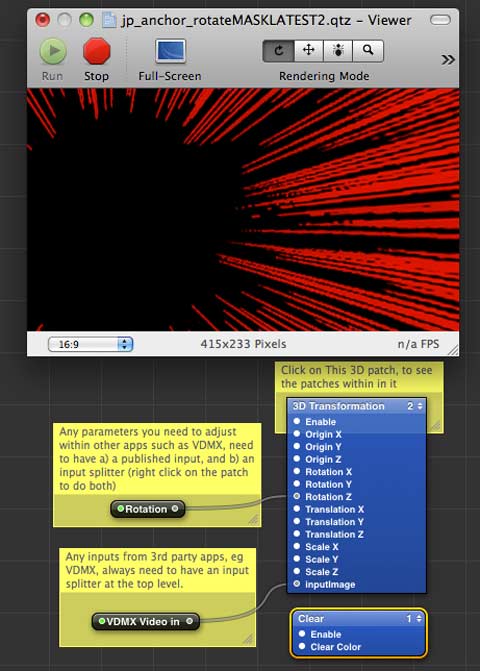


Some notes from that screenshot – the viewer window is showing the combined result of 3 layers – each of which is contained within the macro patch. One of those is an image of red manga speed lines (set as the top layer, with blend mode set to add), and the others are a VDMX input, and a mask image to frame the VDMX input. As you can see, the centre of the image is black – because there is no VDMX input at the moment. Creating quartz patches for VDMX seems to involve a weird workflow of using say a webcam ‘video input’ while building a patch, and then swapping over the ‘VDMX video input’ when saving, then testing to see how it works in VDMX, then going back to Quartz and reconnecting the webcam and making adjustments, before reattaching the VDMX input and saving again.
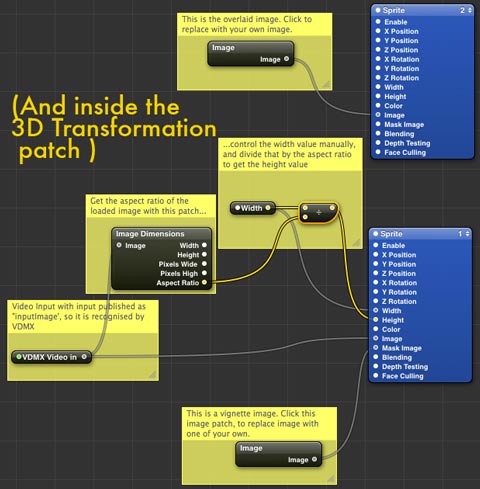


Previously I’d only been working with Billboards in Quartz, which helped avoid 3D space – billboards ‘render a quad positioned with 2 coordinates and which always faces the viewer’. I’d been routing clips and effects in patches to a billboard, which generally meant  the viewer was filled with my video. So to create this anchor patch, I put a Billboard inside the 3D transform patch and set about trying to adjust the subpatch. This didn’t work, and Joris explained why:

“Billboards don’t work in 3d space, so you need to work with sprites. Sprites are basically the same as a billboard, but you need to do some of the height and width calculation yourself. I’ve attached an example of how to offset the anchor point, and how to size the sprite correctly based on different input images.”

The example included the image dimensions patch, which “gives you access to info about your current rendering environment (resolution in pixels and QC measures). You can then use the Math patch to further process this info to fit your needs. This way, when your output changes from 4×3 to 16×9 for instance, your patch will update accordingly. The QC coordination system takes a bit of getting used to, but using the RDD patch to keep things dynamic is a good practice.”

Rotations applied to the 3D macro patch, transform all of the sprites inside it, so I figured I’d try and add a few sprites and create a layered result that could be rotated at will within VDMX. Clicking on a sprite patch reveals in the settings, blend modes of ‘reveal’, ‘add’ and ‘over’. And I figured PNG images with transparency, or videos with alpha channels would allow masking and compositing within Quartz. After a bunch more trial and error, some blending tips via Dan came in handy:

“PNGs with transparency: alpha channels aren’t respected when the Blend Mode of Billboards and Sprites is set to ‘Replace.’ Choose ‘Over’ or ‘Add’ and you’ll see your black backgrounds disappear.

Blending in general: The drawing order of renderers (layers) is determined by the little 1,2,3,n… dropdown box at the upper right corner of blue Renderer patches. Make sure your Clear patch is set to 1 (first/bottom).

Other blend modes: if you type ‘blend’ in the Library search box, you’ll see all the Photoshop-esque blend modes. Again, it’s not like a video mixer — play with the patching order (the Image and Background Image inputs) some. Better yet, make your compositions into plugins and do your mixing/blending in VDMX or another QC host app!”

And eventually, I ended up with this custom masked anchor rotation effect for VDMX – which composites whatever video VDMX is playing, underneath the speed lines, masked by a circle, into the centre of the screen and allows real-time control rotation. Which is really satisfying – custom tuning an effect for a particular purpose. I’ve included the patch below – click on the image sources to replace them with your own, play around with the 3D transform values to create your own rotation variants, and for any parameters you’d wish to access inside VDMX, publish the relevant inputs and splitters.

Download the patch (with inbuilt masks. 2.3 mb) here to play in quartz, and here to use in VDMX ( place it in your QCFX folder and it should show up).

Thanks again to Joris and Dan, who provided insights at just the right times!

Previously:

Learning Quartz Composer Part 1

Learning Quartz Composer Part 2


by Sean Healy, May 25, 2011 0 comments

Technoscape, 3D World, R.I.P.

[[[ Turns out I’ve been doing 3DWorld‘s Technoscape column for around 10 years (and 5-6 patient editors). Below, my very last column for them, after they recently announced they were shutting down. Weirdly, this comes just as 3DWorld seemed to be getting a roll on, boasting a new smaller magazine format, hitting more cities, and starting to sculpt the overall content better.

The downturn in advertising revenue was blamed variously on the GFC, a downturn in clubbing and an increasing shift by promoters to the internet. It was often weird writing a very net focussed column for a weekly print mag, but never more so than this week. And it has certainly been an eventful decade for a column about media technologies. ]]]

</TECHNOSCAPE>

1998: Remember when that new search engine came out, promising better results with it’s algorithmic interrogation of linked relationships online? That was Google, in its PRE-VERB DAYS. Paypal launched that year too.

1999:     Napster. RSS. SETI@Home

2000:    Blogger.

2001:     Wikipedia. Creative Commons. Bit Torrent. The first ipod arrived.

2003:     Myspace (remember that?). Skype. Second Life. the ITunes store. 4chan. Pirate Bay. Delicious. WordPress.

2004:     Facebook (Yep, it has only been that long). World of Warcraft. Flickr

2005:     Youtube. Google Earth.

2006:     Twitter, and a little site called Wikileaks.

2007:     Tumblr. The first iPhone arrived.

2009:     Kickstarter. FourSquare.

2010:     Instagram. Quora.

While I’d like to be able to say I was writing Technoscape since BEFORE GOOGLE EXISTED, I don’t think that was quite the case. 3D World on the other hand, goes back further, splashing it’s first club culture ink in 1989, before Facebook, before MySpace, before Youtube, before Google, BEFORE THE FIRST WEB BROWSER in 1993. Imagine – a time before the web even existed, and there were so many people dancing in dusty warehouses, that they needed their own magazine. In a time BEFORE STATUS UPDATES.

That loose timeline also shows we have no clue about what yet-to-be-invented internet services we’ll likely heavily rely on in only a few years time, and serves as validation for the ‘future proofing’ strategy of installing high bandwidth fibre optic under the NBN scheme. Less validating? Australia’s proposed net filter.

In 2001 some new fledgling software called Ableton Live was born in Berlin. You might’ve been using Photoshop 6.0, Final Cut Pro 3, After Effects 5.0, Cubase VST32 5.1, Pro Tools 5.0, Rebirth(!), Arkaos, VDMX and so on. And today, are we really much better, faster, stronger? A few quick keywords show how our tools and processes and possibilities have evolved: kinect hacks / serato bridge / maxforlive / processing / vvvv / syphon recorder / madmapper / quartz composer / touchOSC. More sophisticated, yepz, but arguably not much different.

3DWorld, it has been a fucking pleasure. Stay in touch via skynoise.net or twitter. I can’t believe this is the very last Technoscape sentence, and it is now exactly 400 words.

by Sean Healy, May 19, 2011 0 comments