iphone Audio apps

iphone_audioapps
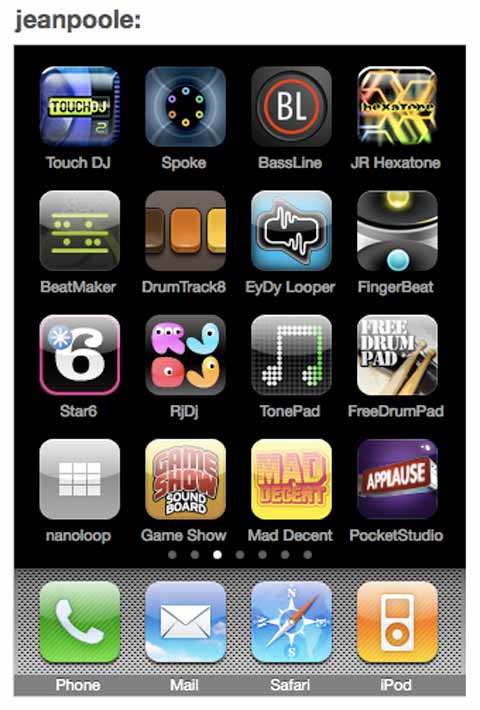
The audio app ecosystem for the iphone is still fairly young, so there’s plenty of apps fighting for attention, and quite a diverse range of approaches to portable music and sound. Below, the fruits of an afternoon’s worth of downloading and testing (and about $73 all up).

Beatmaker $19.99
– Mobile sampler interface with 16 pads (multi-touch up to 5 sounds at once ). Load or record your own samples or use the built-in banks from the likes of Richard Devine, or from genres such as hiphop, dub etc.
– On-board wave editor to select in/out points of samples.
– Fairly intuitive easy to use step sequencer to play arrangements of those samples.
– Delay, 3-band EQ + BitCrusher FX.
– Export audio and midi.

Touch DJ $23.99
The most expensive app on my afternoon list, this offers scratching, looping, positioning, equalization, effects and pitch controls for 2 simultaneously playing mp3 or m4a files. Claims to offer a ‘new’ DJ technology it calls ‘visual mixing’ – which basically shows the waveforms playing as every other piece of DJ software before it has done for the last 10 or so years. Has an onboard sampler ( limited to 3 samples ),

Spoke $2.49
Interesting radial design for creating drum loops. Sounds placed closer to the centre are more quiet, sounds placed further are louder. A clock hand spins around triggering each sound as it passes over it. Something about the lack of any grids seems to make this all the more fun for making loops work. Lacks tempo control, exporting capacity or ability to load samples. A fun toy anyway, and maybe interface ideas worth noticing by other developers?

JR Hexatone $12.99
More interface weirdness here : load six samples into a hexagonal grid, and start six oscillators by pressing play. These oscillators then ‘travel’ through the grid to an end point, changing position on the beat, and being affected by commands as they travel. Four modes of Play : GRID, CELLS, SND, or SET-UP, allow you to rekindle that feeling of playing Dungeons + Dragons with strange numbered a dice and a manual of elaborate rules. Bizarro, but can import + export, change tempo, so maybe of use to some.

Finger BassLine $3.99
I could say this reminds me of making acid-basslines with the old Roland TB-303 Bass Line Synthesizer – but I’ve only ever played around with Rebirth (RIP: rebirthmuseum.com ), software built in 1997 to emulate the old 303 (and the TR-808 and TR-909 rhythmic composers ). And so, now on my phone: monophonic synthesizer with built-in pattern based step sequencer. Sawtooths. Square waves. Filtering. Modulation. Tempo tap. Kids these days.

Nanoloop $8.99
Sequencer, sampler and synthesizer modelled on a version made for the nintendo game boy back in 1999.
“It does not simulate the Game Boy’s sound or other functions, but has been fully optimised for the iPhone’s capabilities.”

RjDj Free / $2.49 option
The original augmented reality music maker. Microphone + algorithims + auto-layered beats = fun times. Featured examples include work by Perth’s Chris McCormick ( Girl Science records ). Branching out these days into other apps :
“Experience LOVE by AIR in a new way, through four real-time soundscapes. Record yourself as you become part of the music, and send your own Love message to someone special.”

EveryDay Looper $4.99
“Record yourself, loop it, layer it, mix it, merge it. And do it again.” The equivalent of a loop pedal used by a guitarist or vocalist. Simple to use, lacking any sort of manipulation capacities ( eg changing pitch / speed or moving loops further forward or backwards in time ).

Tonepad
(Free)
Draw dots on a big grid. Erase some of them. Draw more dots. Move your fingers around the screen. Congratulations, you’ve just made a soundtrack for a Japanese shampoo commercial.

Game Show Sound Board (Free) + Pocket Studio (Free)
Crowd laughter. Applause. Oohs. Ahhs. Bad answer honks. Etc

DrumPad (Free) + Mad Decent (Free)
They’re free. You like hitting stuff, right? A drum kit. And : Air horns, sirens, elephant groans, lazer guns, gunshots, delay. Optional looping, delay and warning siren if someone picks your phone up.

Overall verdict? Lots of little prices add up over time. Necks get sore from hunching over and peering into a little screen for a few hours. And yet, there’s lots of engaging fun to be had. Beatmaker struck the best balance for me, between being fun to use and seeming versatile enough to use for vaguely serious occasions. ( It’s sample bank functions should help get rid of a few sound-board apps too. Except maybe cat piano. That stays for now. )

by Sean Healy, April 22, 2010 0 comments
Learning Quartz Composer Part 1

What is it?
Quartz Composer is a versatile visual programming environment ( mac only +needs either tiger or leopard to work), that enables complex compositions to be created without writing a single line of code. Any mac running 10.4 or later with Quicktime can play quartz compositions as stand-alone files, but importantly, they can also be easily integrated into various workflows for other software ( eg as customised FX in editing or real-time video software) or used as an iTunes visualizer or system screensaver.

In other words, you can build your own interactive software or effects using Quartz 2D, Core Image, Core Video, OpenGL, QuickTime, MIDI System Services, RSS (Really Simple Syndication), XML and various hardware inputs ( eg mouse, audio inputs etc ) – without needing to know any code. It is however, also kinda complicated to get a non-programmer head around. The benefits for mac visualists though, are starting to get too large to ignore: continuous developer and community momentum behind it, easy integration into many other applications ( eg VDMX, Resolume for live work, or other apps for production ), a large body of existing examples that can be customised to suit, and the potential to create or invent visual effects, transitions or processes that are exactly suited to your one-off or overall needs.

With that in mind, I’ve decided to try and document my own learning process with it here, and aim to post a weekly-ish blog post exploring what I’m learning, or what I’m struggling with. Hopefully this’ll motivate me to get up to speed quicker, but also provide something useful for someone else. This first post just sets the scene, puts Quartz Composer in some kinda context, and offers up some links to the key online resources for it. With the next post, I’ll try tackle what it feels like to dive into, and how to start making sense of it, what kinds of rules and quirks it has, and how to start making your own quartz patches. Yes, neantherdal baby steps, because they’re mine. Somewhere in the distance, there’s an endgoal though, of being able to execute a range of long desired visual effects and processes that would be handy / interesting in some situations. And so begins the Hobbit like adventure..

What You’ll Need
– A mac running the Leopard ( preferably ) or tiger operating system.
– XCode Tools ( free on the OS installer disc, once installed, Quartz Composer + examples can be found in the /Developer/Applications/ folder).

qc4
How does it work?
Quartz Composer creates Quartz Compositions ( motion graphics programs that work by assembling ‘patches’ in a workflow for processing and rendering. There are several types of patches eg Composite Patches / Controller Patches / Environment Patches – Filter Patches etc which can be combined in various ways.

User Interface

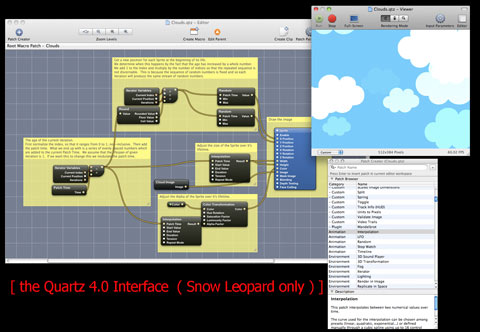
Opening up QC, options for Blank Composition, Graphic Animation, Graphic Transition, Image Filter, Music Visualizer, RSS Visualizer and Screensaver offer easy templates to begin from, and give some idea of the program’s scope.

Once open, there are four main windows to consider:
Editor window – a workspace for assembling and connecting patches. Also, on the editor window toolbar clicking the patch parameters button will open up the Patch Parameter Pane – a place for Editing input parameters.
Patch Creator – utility window for browsing and getting information about QC patches and clips. ( A good place to browse and familiarise with available patches )
Patch Inspector – Utility window for editing input parameters and patch related settings.
Viewer Window – Where you get to see the results of all your pixel mangling.

A good beginner exercise is just to open up the example patches that are installed with the program ( found inside Developer/Examples/Quartz Composer ). Exploring some of those will help clarify the relationships between the above four windows, and give an idea of how it operates. I’ll dive in further with the next post, and the resources below will help anyone wanting to keep on trucking.

Learning Quartz Composer Part 2

Learning with Quartz Part 3 – DIY anchor rotation FX for VDMX

Learning With Quartz Part 4: 3D Objects With Video Textures in VDMX

Learning With Quartz Part 5: Using Twitter Hashtags + RSS Feeds in VDMX

Further Resources
Apple’s QC Guide – Comprehensive breakdown and introductory explanations.
QC Developer Mailing List
http://kineme.net – A community surrounding the development of Quartz Composer custom patches, plugins, and other hacks.
VDMX wiki– Tips for integrating QC into VDMX, links to other QC sources.

Over at Vimeo
vimeo.com/tag:quartzcomposer : 1,477 example QC clips and counting.
vimeo.com/groups/search:quartz
vimeo.com/5616060 – Shakinda shows the basic concepts for setting up QC.
vimeo.com/goto10 – bouncing balls, feedback effects, double helix, QC plugins, dynamic slideshows.

Extra Patches / QTZ FX
http://vdmx.memo.tv – QC patches ready to drop into VDMX.
http://002.vade.info – great QC add-ons from New York’s Vade.

by Sean Healy, April 15, 2010 1 Comment

After Effects Tutorials + Podcasts

After Effects Tutorial Sites
Budding visual artists looking for something like Photoshop with a timeline, usually find themselves at the door of After Effects soon enough. And while higher end software packages exist, it remains a sophisticated and powerful application for creating animation or motion graphics, for layering and compositing text, graphics and video, and for adding special effects or post-producing ( colour corrections etc ). There’s an abundance of tutorial sites online, but there’s a few resources that are particularly handy :

videocopilot.net – has a great range of free introductory video tutorials, and sells more advanced tutorials ( as well as software plugins ).
ae.tutsplus.com – Probably the most regularly updating AE blog out there.
aescripts.com – Useful scripts that can make several tasks easier ( auto-detect edit points and separate clips into individual layers? No problem. )
[ And via Synesthete in the comments :
GREYSCALEGORILLA – has AE gems mixed in C4D and production tips.
maltaannon – in depth AE
Making It Look Great – paid DVD tutorial series has some great stuff. ]

creativecow.net/after-effects-tutorials-podcast – The pioneering motion graphics site also has 150+ video podcast episodes to wander through, from easy through to brain-squintingly hard. Which reminds…

Alternatives to Itunes For Podcasts
While the iphone/itunes combo can be a delight, it can also be a pain in the ass – Apple extending it’s control too far, and trying to limit how easily media can be moved too and from your device. Stepping outside the itunes publishing monopoly also reminds how much more can be found on the web. And indeed, there are several options for subscribing to podcasts :

Doubletwist.com
This looks interesting, coming from a company with ‘DVD Jon’ onboard ( famous for reverse engineering many pieces of software for the purpose of allowing citizens to do what they wanted with files ):
“We started doubleTwist because we were disappointed by the quality of software applications offered by the major device manufacturers. We feel that just like you don’t use a different browser for every web site you visit (Firefox to read the NY Times, IE to stream Hulu, Chrome to browse YouTube, etc) you shouldn’t have to use iTunes for Apple products, Nokia software for Nokia phones, Sony software for Sony products, etc. The typical household today has many such devices and there is a need for a simple and powerful software that connects them.”
Boasts a much bigger podcast directory than itunes, and features easy sync with any gadget, as well as amazon.com mp3 access.
Songbird ( mac / pc / linux )
Smoother interface, easy gadget syncing, social media integration, artist ticket updates.

Miro ( mac/PC/linux )
Includes audio, video podcast subscribing, bit torrent downloads, HD optimisation, smooth interface.

yamipod.com ( mac / pc / linux )
No podcast services, but worth mentioning as a good freeware app to manage an ipod.

Love to hear about any other recommended podcasts, be it tutorial wise, or clever audio storytelling from the likes of Radiolab… Drop a line if there’s something you love..

by Sean Healy, April 9, 2010 1 Comment

Visual Rhythms by Two Eriks + Johan

Erik Gandini, Erik Pauser & Johan Soderberg that’d be. Fine (interconnected ) feature film fiends. Let’s start with:

videocracy
Videocracy ( 2009 )
Directed Erik Gandini / edited Johan Soderberg
Imagine a country where the owner of the biggest Television network, and several press outlets, also becomes the elected leader of the country. That country is Italy, and because the several sprawling scandals around President Silvio Berlusconi are not covered in Italian news ( but widely elsewhere), it’s surprising there aren’t a greater number of critical documentary documentaries about this.

“Berlusconi has created a culture of banality so that collective societal desires are no longer important. People in Italy now just want to be television stars so they can be famous and rich. There’s a strong tension between those who are on TV and those who are not. For young Italians, power is embodied by those who are celebrities…. What I’m really interested in here is how you can destroy a democracy by tits and ass. It’s shocking that the banality of culture can destroy a once mature and politically engaged populace,” argues Gandini in an Indiewire interview.

The resulting film is an almost spooky glimpse of a society governed by an obsession with celebrity, and a Governor obsessed by the power that television can manifest. Those who have seen Mike Judge’s comedy Idiocracy, about society’s devolution through television will be mightily amused / horrified at the parallels. Director Erik Gandini is well known for covering provocative topics, including – Gitmo, Bosnian refugees in Sweden, and the 100,000 children American soldiers left behind in Vietnam, but we’ll mention here his other Soderberg collaboration:

Surplus: terrorised into being consumers (2003).
Directed Erik Gandini / edited Johan Soderberg
This film is Gandini’s personal visual odyssey about the destructive nature of consumer culture, threaded together with Soderberg’s trademark rhythmic, often musical editing. While the film as a whole doesn’t necessarily provide a strong coherence, it has plenty of powerful moments, many which derive from the ways in which Soderberg marries sound and vision, and understands the power of letting raw images to play out by themselves over time, or looping and repeating them as need be. ( Available on DVD )

luckypeoplecentre_int
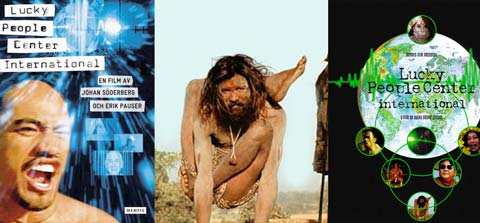
Lucky People Centre International (1998)
Directed + Edited : Erik Pauser / Johan Soderberg

Finally, this vastly under-rated film is available on DVD, do yourself a flavour. Lucky People Centre was a Swedish artist collective known for their electronic music, video projects, a couple of audiovisual albums ( not just tracks with videos, but editing video source material samples to make music ), and this film as their pinnacle achievement.

“Lucky People Center International takes us on a journey around the world, navigating by means of people’s inner life. The use of music and rhythm and the pulsating form of the film are reminiscent of the aesthetic tools of music videos, and provide a fresh approach to documentary filming. The film team spent two years travelling the world looking for people and ways of living reflecting the world.. and so we encounter voodoo powers, the investigative methods of a brain research scientist, Buddhism’s view of death, a former porn actress (Annie Sprinkle) and her thoughts on pleasure, a banker and his ecstatic needs, and much more, all held together by musical rhythms and the song of the gibbon.”

On an entertainment and provocation level, the film is loaded with a fascinatingly diverse range of people and situations, but beyond that, the film’s audiovisual relationships, the layered multi-linear storytelling, and the rhythmic approaches to editing ( sound and vision ), mean this is
( Can’t link to them directly ( Oh, Flash, hai there~! ) but click through the interface to find a series of LPC videos at soderberg.tv )
Tokyo Noise ( 2002 )
Directed + Edited : Erik Pauser / Johan Soderberg
This is a gentler documentary exploring the character of Tokyo through the lives of interesting characters, but again includes wonderfully expressive editing and audiovisual sequences.

Tong Tana (2001)
Directed: Erik Pauser
Powerful story about a Swiss man who went to live in the Borneo jungle, and ended up living with, and defending the locals.

The Voice ( 2005 )
Directed + Edited : Erik Pauser / Johan Soderberg
A well edited and animated music-video style exploration of global power. ( Available on DVD )

Read my lips, that Bush + Blair duet that blew up online a few years ago? That was Soderberg too.

by Sean Healy, March 18, 2010 0 comments

Screensharing, MPEG StreamClip + Fat Tag

Screen Sharing
No, not chat roulette. Skype. Video screen sharing. This has been around a while, but it has so much potential, I wanted to mention it here. As well as video chatting, Skype also allows the easy option of sharing portions of a desktop screen between people. It works at a decent framerate and crisp resolution, without much lag, and the audio chat works fine on top. Once you’ve used it – a few possibilities leap out straight away:

– collaborating on projects via tropical hammocks. (“no, no – I think an edit to a darker scene at 1:47.. like this… just a sec.. topping up my coconut juice”)
– remote tutorials (in real-time rather than recording and uploading).
– really direct feedback and refining of work ( compared to email ping pong and uploading / downloading test clips / songs / graphics etc )
– live remixing of processed video from afar

A friend introduced me to this while we were working on an animation project together, and it was so effective at jumping to problem areas on a timeline, and changing things immediately without having to render and upload etc. Move this bit here, put that on the other side of the screen, a bit less of that effect etc.

Working on an animation project with a friend, we began to use it quite a lot to show each other where we were at on the timeline, able to voice chat at the same time, and request to adjust parts, or jump to certain parts of the timeline. Really useful, and

MPEG StreamClip
Elsewhere in the so-damn-useful video software ballpark, is the free MPEG Streamclip from Italy, an awesome but under appreciated bundle of code downloadable from http://www.squared5.com:

“MPEG Streamclip is a powerful free video converter, player, editor for Mac and Windows. It can play many movie files, not only MPEGs; it can convert MPEG files between muxed/demuxed formats for authoring; it can encode movies to many formats, including iPod; it can cut, trim and join movies. MPEG Streamclip can also download videos from YouTube and Google by entering the page URL.

You can use MPEG Streamclip to open and play most movie formats including MPEG files or transport streams; edit them with Cut, Copy, Paste, and Trim; set In/Out points and convert them into muxed or demuxed files, or export them to QuickTime, AVI, DV and MPEG-4 files with more than professional quality, so you can easily import them in a DVD authoring tool, and use them with many other applications or devices.”

It support a huge range of file formats, allows easy cropping of images ( to get rid of bad borders etc ), it does batch processing, it lets you easily export snippets from DVDs, it can split large files onto multiple discs, and the list goes on. A must download for any video-heads.

http://fffff.at/fattag-meet-projector
For whatever reason, the iphone’s video out can’t be used while using apps – without jailbreaking the iphone. In other words, the phone has the capacity, but this is being annoyingly withheld. Once jailbroken, yes, there’s an app for ensuring video out while playing games or using visual tools. And a sign that this dormant feature might become activated? Try the ‘fat tag’ graffiti app – which although doesn’t support video out in it’s official version, has been made available as a custom version that does. Draw, paint, connect video out to projector and there’s a nice little portable touchscreen projection rig right there.

Bonus Round
http://wayneandwax.com/?p=3069 Free album by Mutamassik, That Which Death Cannot Destroy
http://flattr.com/beta – micropayments system designed by one of the pirate bay

by Sean Healy, March 17, 2010 0 comments