Video Screen Capture Options

Creation of moving imagery is aided greatly by some good old fashioned screen sampling.

UPDATE : The Syphon app (mentioned below) routes video losslessly between video software using the graphics card, and now the Syphon recorder can record the output of these apps. Send feedback, flowers to Vade and Bangnoise.

Free screen capture options:
PC – Camstudio /, Mac – Capture me. And Vade’s free screen capture tool (mac) allows you to ‘capture your entire desktop, or a portion of it, to an image and further process it within Quartz Composer or supported host applications. This can be used to sample other application’s windows as a source input for post processing, texture mapping on to models, etc’. Which means in practice, VJs can use it to grab screen content (eg games, DVDs, web, cams, other software output – whatever you can see on the screen ), and then process this feed in VDMX however they like.

More Broadcasty Tailored Options
Snapz Pro (mac:$69) and Screenflow (mac$99) offer simultaneous camera, microphone and audio capture as well as screencast options such as highlighting the mouse, key commands or certain windows.GrabberRaster (mac) allows sampling of any portion of the Mac screen for use as input for Quartz Composer, or as virtual camera input for QuickTime Pro, Skype, CamCamX or other QuickTime-compatible webcam software. $99 bundled with a bunch of other cam FX.

Sampling VDMX with Syphon and BoinxTV

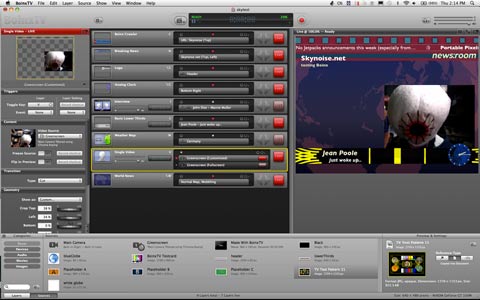
Boinx TV is a custom video application for live mixing and recording of presentations / tutorials / news stories etc. Syphon (mac) not only samples the screen – but allows real-time sharing of full frame rate video or stills, with other applications. Future versions of Syphon are likely to have built in recording options. For now though, combining Syphon with Boinx, Berlin’s @fALk_g and Leon von Tippelskirch, one of the Boinx developers, came up with an effective way for recording VDMX – and it works in HD!

This could be a great workflow breakthrough for people creating motion graphics or doing compositing or visual effects. Being able to easily improvise with VJ software and midi controllers will never replace some of the detailed micro-level animation and editing done in dedicated editing and compositing software, but it should make it much easier and more fun to create certain kinds of clips for layering / visual effects / remixing and re-use etc. And who knows what kinds of new workflows (playflows?) and processes might follow from there..

Instructions via @fALk_g:

– Install Syphon and Quartz Syphon Plugins (free), and BoinxTV Home Edition ($49) ( see Boinx review)
– Activate Syphon Output in VDMX (beta 8 via vidvox.net)
– Load custom quartz project into BOINX, that can tap into the Syphon source. (download file 82k)
– Hit record. The custom project records with the Apple Intermediate codec (for best balance of quality and performance), but can be adjusted within settings. For best quality and framerate, Falk recommends playing clips from one drive and recording to a separate drive.

Bonus speed gain: Because Syphon is feeding video to Boinx, you can deactivate VDMX Output and use the Boinx 2nd monitor output to view your VDMX mixing – it actually seems to improve performance / frame rate.

The above instructions and file worked fine for me, but I haven’t really tested how far it can be pushed (eg lots of layers and CPU heavy FX in VDMX, while recording HD to a drive). Fun times ahead.

And finally on the screen capture front – a shout out to 9-eyes.com – an incredible collection of unusual moments captured by Google Street View, photographing every road in the world – For The Surrealist Win!

by Sean Healy, March 10, 2011 4 Comments
BoinxTV Review

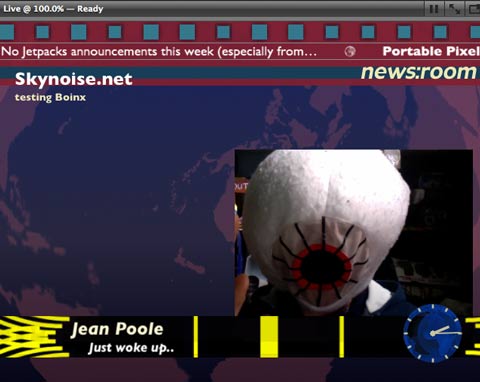
Supercharging that whole laptop as portable TV station idea – Boinx TV.

Boinxscreen

Vat Ist?
Video mixing software (mac only) set up for easy, intuitive real-time control over live cameras, recorded clips, slides, infographics, text and capable of streaming live as it happens.

The BoinxTV Interface
There’s almost nothing within BoinxTV that can’t be done with VJ software – with a lot of customisation and editing. The value of BoinxTV is that a lot of functions very useful for live video presentations, have been compiled thoughtfully into an easy to use interface. New features are selected easily and added as layers to the central interface component. Editing and refining for each layer is done in the left side panel, and the right panel shows the master output. Selecting between and triggering layers and events ( eg switching to a new camera, adding an infographic, doing a cross fade to a net based camera etc ) can be done onscreen, with user keyboard shortcuts, a midi controller or via an iPhone app. It’s a fast and efficient system and would greatly simplify the workflow for making video presentations, tutorials, podcasts or framing live event broadcasts.

Boinxscreen2

Features
Aside from the basics (implemented well) such as video switching, camera switching, scaling and adjusting image quality, inserting graphics and text, Boinx also enables the use of high-grade AXIS network cameras, multiple cameras, the easy inclusion of video skype calls from others, integration of RSS feeds for ticker tape scrolls, as well as twitter feeds (allowing comments from viewers), drawing on screen and decent chroma keying (for an easy newsdesk feel or for the use of virtual backdrops). Users can also create their own custom layers using Apple’s Quartz Composer software.

One of it’s best features is the capacity to bundle all of this up and send all the final master out live online – although this isn’t as simple to access as the rest of the features and will hopefully get integrated into a future version. To stream live requires installation of further software ((either GrabberRaster($) or Camtwist (free)), which makes the Boinx signal compatible for the likes of streaming software such as quicktime broadcaster, ustream, stickam and justin.tv.

Bonus points: Using Syphon, Boinx can record real-time HD output from VJ software running on the same laptop (via @fALk_g in Berlin)

Requirements
Intel Multicore CPU based Mac with discrete graphics (MacBook Pro’s starting late 2007), Mac OS X Leopard (10.5.8) or later. QT 7.66 or later. Webcam or professional video camera with Firewire, SDI or HDMI.
And $49 for Home version, $499 for Full version. (See : http://www.boinx.com/boinxtv/home/compare)

Verdict:
The Home version will probably suit most people’s needs, and is a remarkably featured piece of software, which can greatly simplify the production of video presentations, video podcasts, screencasts, and tutorials. It’s also a very easy and convenient way to add a layer of professional depth to any live net broadcasts.

by Sean Healy, March 10, 2011 1 Comment

iStopmotion 2 Pro Review

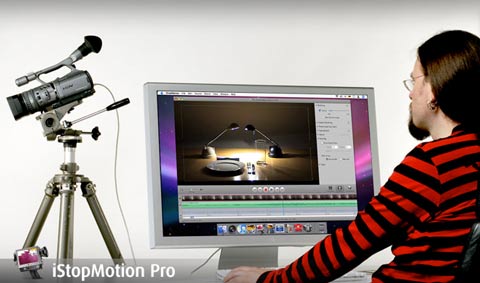
istopmotion
Fruit and vegetable dance choreography ( or claymation zombie wars ) just got easier with version 2.5 of iStop motion. 

Vat Ist?
Stop motion ( or stop action ) animation creates the illusion of movement by photographing objects in new positions for every frame. iStopmotion is software dedicated to streamlining that process as much as possible, offering a range of previews, adjustments and relevant effects for monitoring a camera connected to your computer and ensuring accurate controls over the movement of your objects.

Features
While there are for more powerful (and expensive) animation software packages available, the beauty of iStopmotion is in it’s dedicated focus, and the feature set is tailored and trimmed to specifically suit the needs of stop motion animators, avoiding other animation complexities. Below, some of the ways stop motion life becomes easier:

– Image capture adjustments ( flip or rotate image / colour correction and presets / use of overlays and grids for guidance ).
( Note – in terms of image capture, most Canon DSLR cameras are no longer supported in Mac OS X Snow Leopard 10.6.5 and 10.6.6. This is a result of Apple’s dropping of support for those cameras though, not a fault of iStopmotion itself, but hopefully it’s something that will be resolved soon. )
– Onion skinning ( overlays of each frame to allow understanding of how a sequence of movements will look )
– built-in chroma ( or green / blue ) screening
– Custom foregrounds and backgrounds can easily be inserted
– No in-built painting / editing of frames, but it does support easy transferral of frames to Photoshop for that purpose, and then adjusts the frame to suit the new edits.
– Support for using a soundtrack and/or other layers of video as animation guidance.
– Support for the Apple remote control, to capture images from your animation work-table.
– Support for multiple cameras at once
– Integration with Final Cut Pro
– Tilt Shift effect – for applying that miniature real world look.
– Time Lapse capture – create time based effects by capturing frames at specified gaps of time.

And cutely, there’s an option for printing animation sequences as a Flip Book.

Requirements
OS X ( it’s mac only software ), Snow Leopard recommended, but earlier versions still available for use on earlier systems.
Cash: $49 for home version, $99 for Express version and $499 for Pro version ( Major differences are the maximum resolution size, and integration with FCP. Free demo available.

Verdict
No, it’s not After Effects, but for stopmotion enthusiasts, this is a great way to streamline and focus animations.

by Sean Healy, March 3, 2011 0 comments

Musical Cinema And Software Hacking

soderberg
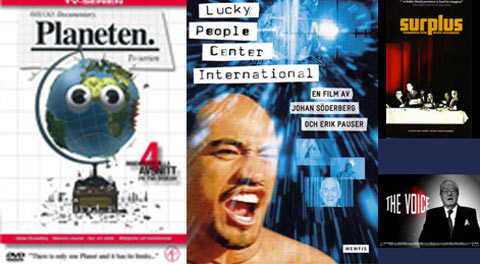
Funny that it’s a DVD called ‘The Planet‘, that sends me back into the lands of region free firmware hacking and ripping software.

The Swedes Sent It
Specifically, it was Johan Söderberg, or one of his webmonkeys, who sent the Region 2 encoded disc all the way to Australia (region 4). The Planet is a made for TV environmental documentary, from 2006, but given the quality of his earlier film, Lucky People Centre International, and Soderberg’s editing efforts in general, it seemed worth a shot. ( Sodeberg is also famous as the editor of that Iraq war related lip-synced love duet featuring Tony Blair and George W. Bush) Anyway, it had been a while since I’d bought a DVD. The disc goes in, and up pops the reminder of region encoding. Pushed by the motion picture industry so films can be released at different dates at different times, through different distributors, and only effectively managing to annoy people who have paid to watch a film. Way to drive people to piracy.

Region Free Options On Mac
Include ripping the disc to your hard-drive, and removing the region code restrictions using Mac The Ripper. Takes time and space.
Handbrake will transcode your DVD into a playable movie file. Takes even more time, but less space.
Or – for the adventurous – the mac firmware can be upgraded / de-crippled using free software and instructions from http://forum.rpc1.org/ ( see the mac section ). Once your drive’s firmware is changed to region-free, you’ll also need Region X to select a region each time.
There, aren’t you glad you bought the disc, rather than downloaded a version you could watch straight away?

While It Rips
It’s worth pointing out a few worthwhile projects, that explore some of the Lucky People styled audiovisual terrain:
Sound of Noise is a feature film that uses found objects onscreen as musical instruments, and is made by the musicians involved with ‘Music for One Apartment and Six Drummers‘. Also a Swedish enterprise, and released in Dec 2010.
Chris Cunningham has plans to deliver an audiovisual album. ( See track 1 set in New York, a remix of Gil Scott Heron )
Pogo from Perth, is developing a global collection / album / DVD by cutting new tracks to footage shot in various locations ( after funding travel there by kickstarter ).

by Sean Healy, February 21, 2011 0 comments

On The Road with Scattermusic Soundsystem

Scattermusic East Coast Tour Highlights from jeanpoole on Vimeo.

Part of the reason I’ve been quiet on the blog this year, was because of a very busy November and December with video. So it’s good to finally reflect some of that. Back in November I travelled up the Australian East Coast with the Scattermusic Sound System. Which meant 5 guys with 5 laptops in a van for 3 weeks, a dozen gigs, bouncing from Melbourne to Brisbane and back in a space-age Tarago, foam parties, passing through schoolies week in the Gold Coast, realising that our Wagga Wagga gig was at the same time as a world bantam weight boxing match being screened at the same venue, burnouts in Ballarat (as savoured by French Fries who had come along for that gig), Mat Cant twittering away and getting shout outs from Rinse.fm as we travelled, a projector mount that clamped onto anything ( including hotel cabin doorframes for late night movies ), and of course, a never ending supply of great tunes (most overheard sentence in the van? “This track is sick.”)…

Being able to actually document projections in a half-decent way now ( thanks to picking up a Canon 7D last year ), means I’m going to publishing a lot more video online from here in. It’s something that has been a long time coming, and I’m quite happy about finally getting that ball rolling.

Video credits:
Music: Scattermusic soundsystem feat Serocee – east coast anthem (mat cant dub edit)
Video edit, camera work and tour VJing by Jean Poole.
( Geelong photo by The Cheap Assassin, Bin Juice cover art by Michael Cusack )

by Sean Healy, January 25, 2011 0 comments