
Assessment Criteria for Spatial Design With Video
As brainstormed last week, here’s the list of criteria to think about while developing your spatial design, listed in order of importance:
– Conceptually linked to ‘perception in motion’
– Effectively exploring site context:
lighting / colour / materials / sound / viewer location + pathways
– Relationship with video content + site
– How is 3D space used well, for video display ? (eg depth / juxtaposition / angles )
– Juxtaposed clips / editing / techniques ( that take advantage of the space / materials / light / site etc )
– Technical parameters ( eg contrast / frame rate / projection mapping accuracy / documentation)
Related Questions from Earlier Weeks:
– For your spatial video design, what is the key idea you are trying to communicate in relation to ‘Perception in Motion’ ?
– What are interesting aspects of your site?
– How are you using these aspects to showcase your main ideas?
– What equipment do you need?
– What new video do you need to create / re-composite etc?
– How are you going to document your project strengths effectively?
Software for Projection:
Free :
AVMixer Lite – free to use for 30 days… for playing back / mixing + compositing clips, but not mapping/warping . ( mac / PC )
VPT (Video Projection Tool) ( Free for mac+PC, does complex mapping, has a few learning curves.)
Cheap: VDMX on sale for $99 – End Of Semester Sale – Get VDMX for just 99 USD through May 27 2013 ( mac only – very versatile for playing videos, adjusting colours and effects in real-time, and some degree of mapping / warping, to help ‘map’ projected video onto surfaces. Recommended! )
Not So Cheap:
Mac : Madmapper ( capable of complex mapping, very intuitive to use… )
Millumin (good for timelines + triggering different clips over time, mapping and some image control )
( See also: Tagtool for iPad )
PC: Resolume (for triggering / mixing / colour grading clips in real-time) +Visution Mapio (as a Resolume plug-in for doing mapping.. )
Time, Rhythm of Light, and Looping:
A nicely looped video is very helpful when trying to document video projection. A trick for creating seamless video loops?
- Cut your video clip in half.
- Place the first half after the second half. (The new last frame of your video, will lead perfectly into your new first frame)
- At the new edit point between the two halves, create a transition / dissolve between the two clips.
- Instead of a jolting edit, when your looped clip goes back to the beginning, your clip should now loop smoothly, with a subtle cross-fade in the middle.. )
- This technique is used a lot in motion graphics for making background textural loops
Istanbul based artist, Erdal Inci, creates hypnotic animated GIFS out of carefully lit photographs and video.
(See also: rrrrrrrroll (as mentioned in Week 4 ) / OK GO / After Effects tutorials for ‘echo effect’ + time remapping… )
Your final documentation might be a linear video –
but how can it represent the non-linear (eg modular/interactive rather than ‘beginning to ending’) aspects
and multi-linear (eg many simultaneous pathways / viewpoints / angles ) possibilities, of your installation?
(Non-linear? EnergyFlow is an interesting video project that harnesses non-linear structure.)
(Think about composition / split-screen possibilities – as well as how you use layers of video, text, image and sound….
When thinking about time – what role does sound play within your project – and it’s documentation?
(Tangental, but interesting interview on recording city soundscapes: “You learn a lot about the city by asking about its sound”: Peter Cusack Interview, Sounds )
Other Inspirations:
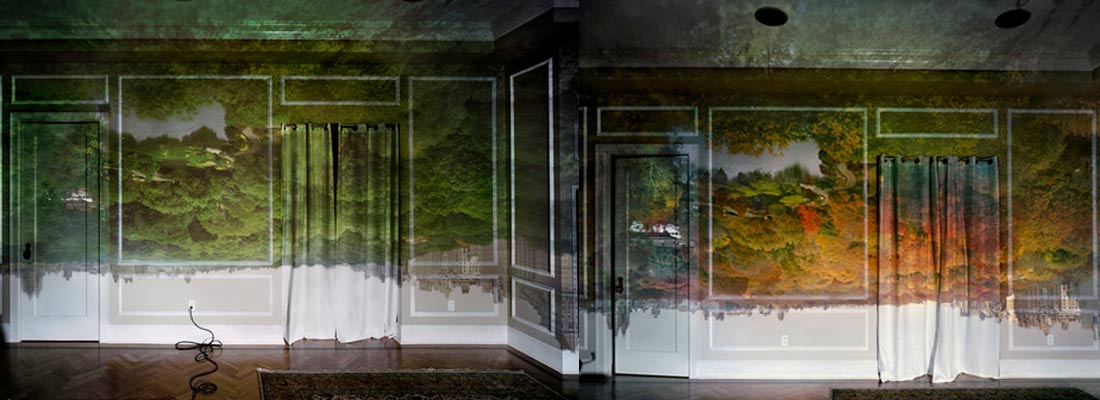
“I made my first picture using camera obscura techniques in my darkened living room in 1991. In setting up a room to make this kind of photograph, I cover all windows with black plastic in order to achieve total darkness. Then, I cut a small hole in the material I use to cover the windows. This opening allows an inverted image of the view outside to flood onto the back walls of the room. Typically then I focused my large-format camera on the incoming image on the wall then make a camera exposure on film. In the beginning, exposures took from five to ten hours”. [see more]
[[ What is the relationship between your projected image, and the surface being projected onto? What kinds of images / colours / textures might best bring out the qualities of your site? Do you have a good range of imagery to test with? ]]
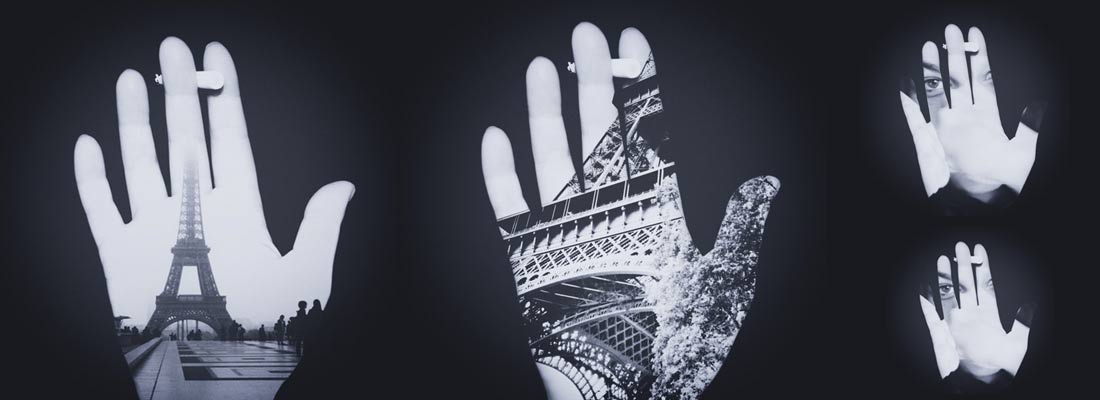
Je Te Tiens, Sous Ma Peau. By Neda Vent Fischer
[[ How might you position or angle a projector so that a foreground object / person / surface area is lit up by imagery, but the background is left dark?? ]]
Mirrors and Light:
Alex Andre’s Metamorphosis Project. It’s a six-foot-diameter spinning disc with a hand crank. The disc is made of clear glass and mirrors in alternating quadrants. You stand on one side and line up your nose with a person standing on the other side. As the disc spins, you see a rapidly flickering image of your reflection and the other person’s face.
“Archimedes” is a light show installation created by Emmanuel Biard, David Leonard and Alfred Darlington for L.A.-based musician Daedelus’ live concert shows.
Previous Posts:
Week 10: Projections + Installations
Week 9: Projections + Installations
Exploring Time Based Techniques
Video Submission Details
Week 7: Video Compositing With After Effects
Week 6: Video-editing-compositing-ii
Week 5: Video Editing + Compositing
Week 4: Choreographing the Moving Image
Week 3: Framing and Composition
Week 1: An Overview