
“Mp3 is the new radio.”
– Chuck D, still an Enemy of the Public after all these years.
Funny to see the rifle cross-hairs lining up on a piece of software, lines of code, but the record companies made sure they were deadly accurate when it came to Napster, the original data gangster, that came to symbolise file-sharing online. Being centrally organised meant that a target was even possible, but what to do with this next generation of decentralised file-sharing apps – where there are no central servers for record executives to close down?
Next Gen P2P
There’s a veritable army of apps out there vying for attention – each with their pros & cons – best be reading up about them to what suits your needs best. There’s also a wide array of p2p news and advocacy sites. These are some of the best:
www.slyck.com – Nothing to do with pizza, but includes a great range of Slyck guides for a range of apps like KaZaA, eDonkey, SoulSeek, Morpheus & a stack of others, as well as how to share files in Newsgroups and irc chat channels.
www.netweed.com/filesharing, www.zeropaid.com and http://p2pnet.net/index.php both offer a very extensive range of file-sharing links, articles and related news snippets.
www.xfactor.cc – is one of the better mac p2p apps, and www.mac-p2p.com gives a good overview of mac p2p possibilities – including a very helpful “History of P2P” article.
Bit Torrent
This app is interesting, and worth looking at all by it’s purty lil self – unlike traditional file sharing systems, its primary intention is to provide an efficient way to distribute the same file to a large group of people by having everybody that downloads a file also upload it to others. Which means it is great for downloading really large files. This is a quick n easy guide to bit torrent downloading (available on most platforms ).
Part 1 – get bit torrent:
http://wiki.etree.org/index.php?page=BitTorrent
http://en.wikipedia.org/wiki/Bittorrent
http://sarwat.net/bittorrent/
http://bitconjurer.org/BitTorrent/download.html
Part 2
Download torrent files from places such as:
www.suprnova.org
www.Isohunt.com
www.Filesoup.com
www.Torrentreactor.com
Part 3
Leave your torrent file running a while after your download is complete – until the size of your download has also been uploaded elsewhere. This way the whole network benefits from sharing bandwidth / download speed from u a little.
Part 4
Make a torrent ‘seed file’ about one your files, and send that to the network, so the network can share your creative juices / booty. ( see www.torrentaid.com )
buon appetito~!
Miscellaneous P2P Tips
“It’s just like the internet – except it’s real…”
– the guy behind me @ Dizzee Rascal, Prince of Wales, Melbourne, Jul 22, 2004, in response to the ‘on-stage talent’ during Dizzee’s ‘shake it’ competition for ‘all tha fine Australian ladies in the house’.
Yes indeed, our online habits continually creep into our ‘real-world’ perceptions and experiences. All the more reason to avoid bad online habits, such as attracting the odd virus here and there. Regular P2P users would be well advised to read up on security and privacy matters, as many of the peer to peer apps are notorious for allowing various kinds of unauthorised access to your computer. Google is your friend, and while there, grab yourself a ‘download manager’ which will improve your web downloading and allow you to resume downloads even after that browser has crashed for the 7th time.
by Sean Healy, July 20, 2004 0 comments
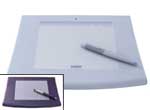 Quake and Counter-strike advocates are quick to point out to critics, the benefits of long hours before the screen. And perhaps our generation may indeed enjoy ‘improved hand-eye co-ordination’, but even hardened mouse and joystick users will still require a little getting used to a pen and graphics tablet. The Intuos 2 is mapped out in such a way that the tablet represents the entire screen. Move your pen over particular section of the tablet, and the cursor will appear over the equivalent section of the screen. Simple enough, and you get used to it quickly, but still a little strange at first. The model I tried was the Intuos2 6″x8″(inches), which means the area you can move your pen over is roughly ‘A5’, or half an ‘A4’ page.
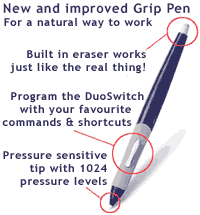 Graphics tablets are potentially useufl input devices in many ways. Because the tablet very effectively mimics the screenspace, they can make very effective Controller devices for audio and video – where you can have quick and accurate access to the X & Y co-ordinates of the screen and control parameters within an audio or video program. Unlike a mouse though – when you lift your pen and lower it elsewhere on the tablet, the cursor doesn’t drag along to the point, it jumps to it – allowing for different ways to approach FX.