
What is Projection Mapping?

– Above, mural by Elian Chali
Projection Mapping examples (listed in week one)
Gertrude st Projection Festival (lots of projection installations, esp 6-10pm, this Thu-Sun)
Assignment Ideas
Cinematic Principles
If cinema is a language, what is made up of? And of special interest for us, how does it relate to 2D and 3D space?
Exercise – Understanding the cinematic language
using –
– the Yale Film Studies Guide
– the Cinematography , misc-en-scene and editing Guides by the College, Film + Media Studies
and the PDFs and insights uploaded from week one
– identify some of the features of your chosen film scene…
and explain the characteristics of these features, or how they help frame the meaning of your film scene.
How would different techniques change the meaning?
Note: Melbourne International Film Festival runs from Aug 4-20, and their program represents a great chance to research different techniques and approaches for the screen.
What is Video?
Technically?
Video is complicated. “If we take a moment to understand the bigger picture of video.. how it is transmitted electrically, how it is displayed by TVs and monitors… then suddenly it becomes tremendously easier to understand where these videosyncracies come from”
“Video is an electronic medium for the recording, copying, playback, broadcasting, and display of moving visual media.[1]
Video was first developed for mechanical television systems, which were quickly replaced by cathode ray tube (CRT) systems which were later replaced by flat panel displays of several types.
Video systems vary in display resolution, aspect ratio, refresh rate, color capabilities and other qualities. Analog and digital variants exist and can be carried on a variety of media, including radio broadcast, magnetic tape, optical discs, computer files, and network streaming.” – Wikipedia’s definition of video
Vimeo’s compression guidelines are just for web publishing, and not necessarily relevant for installations (where we aren’t constrained by needing small file sizes for internet transmission) – but they serve as a succinct guide to some of the key technical parameters to consider when publishing video.
Conceptually?
What is Editing?
“Writing, of course, is writing, acting comes from the theater, and cinematography comes from photography. Editing is unique to film. You can see something from different points of view almost simultaneously, and it creates a new experience.” – Stanley Kubrick
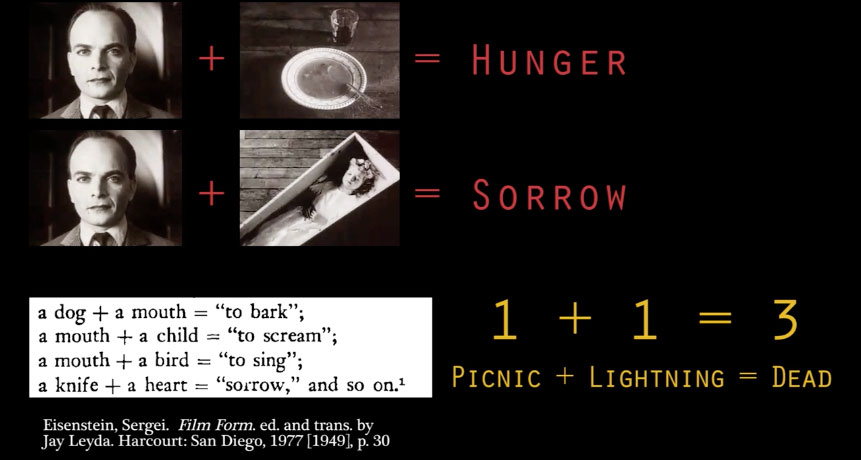
Screenshot above from Editing as Punctuation in Film by Max Tohline.
1+1 = 3 – refers to the edit creating a third piece of meaning for two clips, that of the relationship between them.
This was first known and explored as the Kuleshov effect… and was especially exploited by Hitchcock. (He describes it’s effectiveness here, using a baby and a woman in a bikini.)
Walter Murch’s In The Blink of An Eye is a classic text for editors (and makes for an interesting and provocative read for any creatives.) (Video of Walter discussing editing.)
Murch’s list of priorities when analyzing a good cut:
Emotion: 51% Is it true to the emotion of the moment?
Story: 23% Does it advanced the story?
Rhythm: 10% Does it occur at a moment that is rhythmically interesting and “right”?
Eye-Trace: 7% Does it acknowledge eye-trace (the concern with the location and movement of the audience’s focus of interest within the frame?
Two-dimensional Plane of Screen: 5% Does it respect “planarity” (the grammar of three dimensions transposed by photography to two)?
Three-dimensional Space of Action: 4% Does it respect three-dimensional continuity of the actual space of where people are in the room and in relation to one another?
Editing With Premiere
Briefly we’ll look at Photoshop’s interface (see also Photoshop CC 2017 One-on-One: Fundamentals) and then Premiere’s.
You should have already explored part 1 of : https://www.lynda.com/Premiere-Pro-tutorials/Premiere-Pro-CC-Essential-Training-2015/371692-2.html
Exercise : Edit a HD (1920 x 1080) sequence in Premiere that includes
Cuts and cross-fades
A composited section, featuring a clip reduced in scale and an image beside it
Two clips composited together using blend modes
A fade to black at the end.
(Use your own videos if you have them, or use download clips from youtube/vimeo using dredown.com or keepvid.com )
Task for Week 2:
Find an interesting video essay about cinema and summarise it in a 1 x A4 page PDF (Try searching directly within vimeo or youtube for ‘video essay’ )
(How to make screenshots on mac, How to make screenshots on PC)
Using 3 x cropped screenshots, and some words to explain what the video essay taught you about an aspect of cinema
Include link for video essay.
Upload to the Week 2 folder.