Strap-On Software : Flip4Mac & Little Snitch

Sometimes humans need a helping hand. Why else would Bart Simpson be now filling inboxes worldwide, naked and straddling a fellow yellow cartoon character, exclaiming “I have bought those pills and now I am a real sex king”? Software too, can be vulnerable to performance issues, and benefit from the assistance of some add-on or helper apps.

Flip4mac Studio Pro 1.06
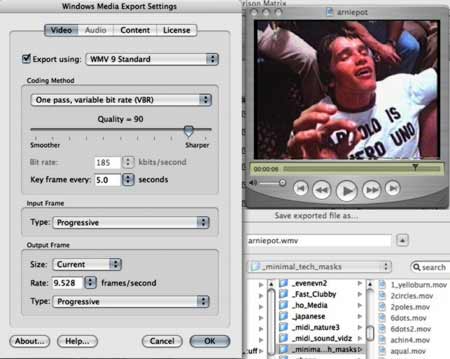
flip4mac screenshot
arniepot.mov to .wmv via flip4mac

Despite the volume of video being published and traded online having ballooned massively in recent years, there still remains several incompatibility and format issues. Videomakers everywhere are still being wounded by return emails saying “Your video wouldn’t work on my computer.” While these problems are not about to disappear anytime soon ( We are still having trouble with mere text in the 21st century – .txt and .rtf files can be read by everybody. If you attach any other kind of text files ( eg .doc ) the receiver needs the same software as you to be able to read it), the Flip4mac software is one small step in a good direction and improves the situation greatly for mac video users, by allowing window media files to become viewable, editable and exportable within quicktime.

Most audio players across many platforms can play the standardised audio format of ‘mp3’. However, while most video players can play the standardised video format of ‘mp4’, not everybody uses mp4 yet and not everybody is interested in maintaining open standards. Further complicating matters is that the ‘mp4’ format is also a ‘container’ or ‘wrapper’ format – meaning it can be used to combine different multimedia streams (mostly audio and video) into one single file. To understand container formats, we need to understand ‘codecs’.

A codec ( think COmpression / DECompression ) is software used to compress large data signals into small spaces with minimal perceived loss of information ( eg mp3, sorenson, cinepak, divX ). And when you play a video file encoded with a certain codec, you need to have that codec installed on your computer to allow it to decompress and playback properly. Container formats such as .mp4, quicktime’s .mov, .avi and .mpeg allow
allow you to combine different multimedia streams (most of the time audio and video) into one single file. This means a .avi or .mov file may in fact include a video file which has been encoded as a divx, meaning it will only play if you have the divx codec installed.

What flip4mac essentially does then , is bring the windows media file format ( .wmv ) into the quicktime ‘container’ architecture, allowing playing of wmv in QT( flip4mac player $9.99US), importing and editing of wmv in QT ( flip4mac player pro $49.99 ), and exporting of Windows Media files from a qt video or qt powered application such as Final Cut Pro ( flip4mac studio $99US ), and export high definition wmv 9 and 5.1 wmv 9 audio from qt or qt apps (flip4mac studio pro $179US).

Once installed, nothing spectacular happens – clicking on .wmv videos simply loads them up in quicktime, and they view as any other video would within quicktime. Quicktime is also used within browsers to embed videos within the design of pages, and in the Safari browser, wmv files worked fine within their pages ( and allowed me to scrub along the timeline which you can’t do with wmv apparently ). Firefox 1.06 however, usually asked for the video to be downloaded ( which you could then watch fine ) rather than neatly embedding the video within the webpage.

All-up Flip4mac runs a treat, have yet to come across a wmv file that won’t play in quicktime with it, and their support for HD and higher end encoding suggests they might be around for a while ( a necessity with the ongoing codec changes ). Well recommended for mac users who want to be able to remix windows media.

UPDATE:::: as of Jan 11 2006 >>

Flip4Mac Version 2.0 is now available at www.flip4mac.com.
Other changed details >>
Flip4Mac WMV Player – Now FREE (previously cost $9.99)
Play SD and HD Windows Media in your QuickTime player and Safari web browser

Flip4Mac WMV Import – $29 (previously WMV Player Pro)
Adds Windows Media import for editing and conversion to other formats

Flip4Mac WMV Studio – $49 (new)
Import and export Windows Media files using expanded preset encoding profiles

Flip4Mac WMV Studio Pro – $99 (previously WMV Studio)
Adds the ability to create your own standard definition, one-pass encoding profiles

Flip4Mac WMV Studio Pro HD – $179 (previously WMV Studio Pro)
Adds the ability to create high definition, multichannel audio, and two-pass encoding profiles

Little Snitch 1.2
What with the crazy Sony CD ‘secret-installer’ debacle of recent times, having a capacity to understand what information flows in and out of your computer is becoming increasingly desirable. Little Snitch serves to fill that gap on the mac platform, monitoring requests for any software to send information to the internet so that you can see these background processes and approve or disapprove. As well as preventing applications from “phoning home”, Little Snitch also protects you from trojans, worms, and other network parasites, shows which applications send information over the internet and ‘provides a higher level of security for the paranoid’. While firewalls are good protection from what is trying to get into your computer, Little Snitch seems the best mac option for protecting what might be trying to get out of your computer. Little Snitch 1.2 has an easy system of rules to click and allow/disallow applications to get online through your machine, is compatible with Mac OS X 10.4 (Tiger), and costs $25US.

by Sean Healy, November 24, 2005 1 Comment

Ode To Web-Geishas

geisha asobi
Geisha Asobi blog
is link site which is introduce funny, crazy and interesting site.”
And as the white noise piles on, more and more we refer to filters to find us the gold. That might be a Dj whose taste we like, a magazine we like, or in the case of Geisha Asobi – I trust that she will never fail to melt my mind with at least one of her links, posted once a fortnight or so. Metafilter.com takes the filtering idea and runs with it, hard. Now a community of several thousand people, it offers a high quantity and standard of weird and amusing links – uploaded daily by it’s members. Monkeyfilter.com is a spin-off by some disgruntled with metafilter. Similarly slashdot.org, the geek news site, has long been offered as a highly successful collaborative publishing model. Hot on it’s heels is digg.com, and diggvsdot.com measures the success rates of each at ‘breaking news’. These are all just high profile examples, and so, so many more exist, but given that most web 2.0 believers have tattoos that say “it’s the way of the future”, the ideas and models, the principles that underpin these sites are well worth chewing for any online projects. insert caffeine break now.

by Sean Healy, November 17, 2005 0 comments

Vat Ist Web 2.0?

Aight. The following market-driven, techno-dribbling is sponsored by smashmyipod.com, ( see also smashmyxbox.com, smashmyps3.com, smashmyrevolution.com ). If I had an ipod, and I chose to smash it, I would choose smashmyipod.com. Web 2.0 then, is either a new era of ‘harnessing collective intelligence’ – or the ghastly hot air filling up the next dot com bubble, depending on who you speak to at the party. Popularised by Tim O Reilly ( he whose company dominates IT book shelves ), ‘Web 2.0’ is simply an attempt to define some of the unique properties of the net software and net practices we’ve been delivered via the development wave of the last few years. Some of us who live in filing cabinets, just get a bit too carried away with it.

From the horse’s mouth, aka Tim O’ Reilly, we get the following descriptions of web 2.0 characteristics >>
* Services, not packaged software, with cost-effective scalability
* Control over unique, hard-to-recreate data sources that get richer as more people use them
* Trusting users as co-developers
* Harnessing collective intelligence
* Leveraging the long tail through customer self-service
* Software above the level of a single device
* Lightweight user interfaces, development models, AND business models

On the ground, or the mouse-click, this might help explain the huge success of collaborative projects such as the massively sprawling co-edited encyclopedia that is Wikipedia ( put an entry in there yourself ), or help describe the shift from static webpages to dynamic webpages – pages freshly updated from database driven infrastructures such as ‘content management systems’, wikis, or the automated publishing juggernaut that is ‘blogging software’. From there we get practices such as ‘social bookmarking’ – exemplified by http://del.icio.us, the practice of ‘tagging‘ to describe content and define our own categories, media sharing sites such as flickr.com ( most popular photo sharing site, and trying it’s hardest to be 2.0 friendly) and a huge range of video sites hoping to do the same ( see 8 contenders reviewed ). And the long tail above refers to a belief that as media diversity continues to expand, a tail of niches long enough will eventually outweigh the mainstream beast at the other end. RSS and being able to subscribe to all of the above though, really compounds the benefits of the above. The BBC as with their documentaries, are succinct in explaining RSS.

The smarter software developers, the smarter media makers harness the collective intelligence of their audiences, understand community as an asset and benefit from the feedback and contributions of the many. Open source software is of course the prime example of this, but site developers are trying their best to facilitate collaborative efforts too. Look at the differences between friendster.com, the networking/ pick-up site which tried to control it’s users too much, or limit their expression – it’s marketshare got eaten by myspace.com which offered much more capacity for users to add media and customise their content. Hard to compete with millions of people adding content everyday.

Special shout out to a company struggling with all this 2.0 bizness – dear old SONY, who in overenthusiasm to prevent music sharing, embedded nasty software on millions of their CDs which secretly installed itself in dangerous ways on the music owner’s computer. And now they’ve been forced to recall millions of CDs, bless their hello kitty socks. ( see a timeline of the drama unfolding ) That’s ‘harness’, not ‘insult’ collective intelligence’… Oops~!

by Sean Healy, November 17, 2005 0 comments

Meta Meta Meta

meta.am snapshots
( meta.am snapshots :: video artist always worth a gratuitous plug. )

This morning metal clawed mountain goats leapt from tooth to tooth inside my mouth. Industrial synthesisers and buzz saws provided a complementary soundtrack. There was no laughing gas. Thanks to the wonders of the internets, sufferers as such, need no longer remain alone, each banal facet of daily existence being slowly mapped out, categorised, dry cleaned, and re-blogged for other re-bloggers to pore over, map out, categorise, dry clean and ……

by Sean Healy, November 17, 2005 0 comments

Putting Your Video Online

(( Now added to my online storage dump / extended brain – a dry & technical 2000 wordish article about compression and other considerations for online video – written a while ago for Australia’s Metro magazine. If video compression settings, explanations, interlacing and compression related links appeal, click away…)) Continue Reading →

by Sean Healy, November 14, 2005 2 Comments