
Sidebar Header

Sidebar Header

Sidebar Header

Sidebar Header

    Video Apps On The iPhone

    Supposedly there’s an app for every splinter of today’s needs. Ask T-Pain and Trent Reznor. Time for a quick scan then, of the creative tools available for pixel-heads, visualists and cinematographers.
    tonetable

    VIDEO
    REEL DIRECTOR – $9.99 and a video editing mobile (3GS) now lives in your pocket. Although understandably limited in scope, it does allow to assemble different clips from your library onto a timeline, edit those, and add a variety of transitions.
    REEL MOMENTS – by the same company, is all about creating time lapse videos.
    SLOMO – let’s you make videos 8 times slower or 2 times faster – with an option to change audio pitch or not.
    AClapboard – $7.99
    VINTAGE VIDEO MAKER $3 – Adds a retro effect. Not really sold on one-filter apps, but it’s probably a while away before there’s going to be an After Effects killer on a phone. Key frames on trams.

    PHOTO / GRAPHICS / ANIMATION
    pCAM Film + Digital Calculator $47.99 Calculates Depth of field, focal length matching, running time to length, underwater distances and other long lists of technical details useful for Directors of photography, film, visual effects etc.
    phone photos swapped with others randomly?
    SKETCHBOOK MOBILE – $5.99 from Autodesk. Multitouch 2500% zoom, paintbrushes 3 layers / import photos. Closest to a mini-photoshop in your pocket I’ve found yet.
    PETIT DUMMY – Add any photo, add audio track, select mouth points, create moving animation.
    FLICKMATION – Frame by frame animation with layers, onion skinning ( transparency which let’s you see the last frame while drawing the new one ) and a stamp system that can be made from existing photos.
    STORYBOARD COMPOSER – $23.99 – An excellent storyboarding app (formerly Hitchcock ), which is possibly the most native feeling app I’ve used. It just seems to harness the touchscreen and gesture controls well, has easy integration of photos, has a great interface, and has a certain immediacy to playing with it, that really encourages exploration.
    REAL CAM SP – $1.19 – onscreen menu items to help control iphone camera better… digital zoom, white balance for specific areas in frame etc. That said, there’s a LOT of one-function photography apps out there, with their one cheesy effect that can be added easily to your snap of the day.
    oscemote

    INTERACTIVE
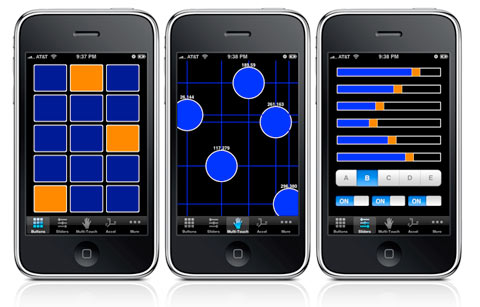
    TOUCH OSC – $5.99 – Let’s you send and receive Open Sound Control messages over a wi-fi network using the UDP protocol. Which means controlling software on your onstage-laptop, from the dancefloor or in front of the speakers / screen etc. Faders, sliders, an X/Y pad, multi-touch. And a visual editor available from their website.
    MRMR – Another OSC app, this one’s free and multi-user by design.
    OSCEMOTE – $5.99 multitouch TUIO, accelermoter xyz
    ispy Cameras $1.19 – view + control camera from public cams, take screenshots
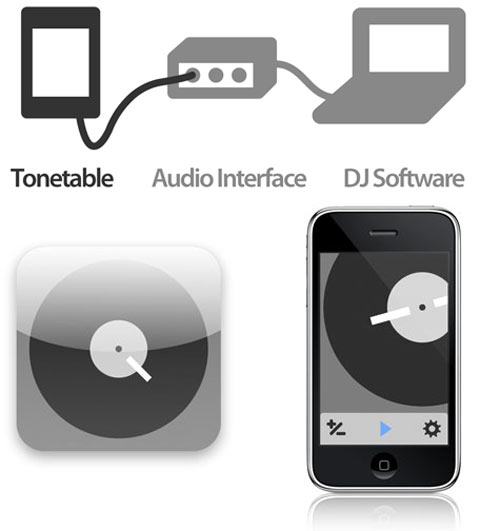
    TONETABLE $9.99 – produces a control tone – for controlling a digital vinyl system – eg serato scratch live / traktor scratch / m-audio’s torq etc. It also allows easy jumping between different pitches through a series of buttons. By the makers of Mix Emergency ( a video mixing app for use with Serato ). And included in this visual app list, because the digital vinyl system can control video as well.
    VLC REMOTE $3.99 – Because you wanted a way to browse your hard drive of Al Jazeera recordings from the comfort of your bed.

    Shout out to CANABALT, a kind of one-finger Bruce Willis platformer, which has captivated this week. ( My record? 5204m )

    Hitchcock, The iPhone Interview

    hitchcock_more
    Storyboarding is fun with Cinemek’s Hitchcock iphone application. (also known as Storyboard Composer )

    When Cinemek’s Jonathan Houser dream of ‘making innovative film tools’ met the iPhone in his pocket, a new mobile storyboarding application was born: Hitchcock. Utilising the iPhone’s touchscreen and built-in camera, Hitchcock adds a layer of fun to location scouting, planning for films and storyboarding sequences. The app has two modes – a panel view that focusses on each shot ( gathered from the photo library ) and allows easy overlays of character stand-ins, camera and character movement and text overlays. The sequential mode allows a finger to slide the panels into a sequence, and control the timing between each shot. There’s something great about the immediacy of being on location, arranging a sequence, and watching it playback to see how well it works as an idea. Hitchcock is a simple app, but executed wonderfully, with a gorgeous interface that encourages play and re-use. When done, press a button and email your completed PDF storyboard. Future developments include : drawing functionality, adding audio, ability to add custom stand-in characters, export to .mov, etc. Cinemek’s Jonathan Houser was happy to answer a few questions about it below.

    More : cinemek.com/hitchcock
    Tutorials : vimeo.com/channels/hitchcock

    hitchcock_storyboard

    How do you feel about Hitchcock today?
    I’m pretty pleased with how Hitchcock turned out as it is version 1.0. It really accomplishes what I set out to do which was create a lightweight mobile app that allows creative people to jot their ideas down in a visual medium. 

    What has the iphone platform been like to develop for?
    As a non-coder I was really supprised at how easy it was to design the app under Apples specifications. They provide developers with tons of tools and free API’s. The hardest part for me was to find a person who had the calibre of coding necessary when you reach beyond those free API’s. Jason Thane at General UI did a great job with this. 

    What changes would you like in future iphones / the future iphone development environment?
    There are many small things that I would like to see. The biggest for me is Apple’s payment process. They are really ambiguous about how they pay you. You may receive reports for a given months sales and the actual fund paid are 20-30% less than what those reports reflect. The worse part is actually contacting them about such problems. It’s pretty messy but I’m sure it’s getting better. 

    What’s missing for you to develop Hitchcock on Android?
    Right now, proven demand. We have been talking to other developers and the success rate for Android porting is very very low. We have not by any means ruled it out, we are taking it one step at a time. There are many updates to the iphone version of Hitchcock we hope to do before we port to other platforms. 

    hitchcock_panel

    Hitchock feels like the beginning of an interesting animation sketching app – have you had any thoughts about creating an app that tilted more towards animation?
    Yes, we are definitely exploring different specialized uses for Hitchcock. I think the animation community is large enough to warrant a application designed directly for that community.

    Other iphone apps that impress?
    There are so many – for filmmaking, the guys at Chemical Wedding just released an app called Artemis. It’s a professional director’s finder for the iphone. It contains just about any lens you can think about shooting on. REALLY cool. As for non filmmaking apps, Convert bot has a really cool interface. Its just a conversion app, but the UI team did a great job with the design. Shazam is still such a cool app. There are a bunch of Augmented reality apps coming out which will prove to be pretty useful. 

    What aspects of the iphone are least utilised by apps?
    I think the biggest aspect of the iphone that is least utilized is multi-touch. It seems like most developers design their apps as ported desktop versions of their app. The buttons are too small and do too little. I think there will be more apps in the future which utilize the whole iphone. 

    Do you have a gallery of favourite storyboards submitted by users anywhere?
    Not yet. But we are planning on creating a community for that. Keep checking in. 

    Popular feature requests?
    .mov export is the biggest request. This will be available really shortly. Possibly the beginning of December. Local PDF creation and emailing. Available in the next update as well. Sharing Hitchcock files. This will be available in the Pro version. Many people want to be able to import more PNG’s for stand-ins. We are working on a slick way to exchange PNG’s on a server. This will be a great tool for people who work on specialized projects. Ie car’s, Zombies, Dogs, people with guns etc. 

    Other iphone app areas you’d like to explore in the future?
    I have a few projects which involved the ipod touch as the software/hardware interface. They are in their infancy still so I cannot go into detail, but they are oriented towards the filmmaking community. 

    Hitchcock Demo from cinemek / Hitchcock on Vimeo.

    Jungle Vision At Meredith This Weekend

    jp | Audiovisual, Cinema, Music, Video, Vj-ing, festival, imagery | Tuesday, 08 December 2009

    junglevision_lewis_jp

    This should be fun! Meredith Music Festival Sat 12th Dec : Outdoors Animal Collective gig at sunset, then Jarvis Cocker, then an hour or so later, an audiovisual gig with Lewis Cancut at the outdoor cinema. From the festival blurb:

    “Jungle-Vision : A Live Audiovisual Safari by Lewis Cancut + Jean Poole
    Deep in the heart of the Congo ( tram stop 124, route 1, Brunswick East ), Lewis Cancut has been cultivating his video-turntable chops – scratching and mixing customised videoclips by Jean Poole at the same time as cutting up regional sonic flavours like baile funk, cumbia and kuduro. Fresh from a more laid back performance @ ACMI by the duo (about the history of television), expect a more uptempo mix for Meredith – equal parts cinema hypnotism and dancefloor grind.

    Lewis Cancut : http://scatterblog.com + http://www.myspace.com/lewiscancut
    Jean Poole : http://video.skynoise.net

    ( Also fun : A Tim Sweeney DJ set @ 2am on Friday night, + a bonus 5-6am addition to the Saturday night line-up : Nathan Fake! )

    Audiomulch 2.0 Review

    jp | Music, Reviews, Software, electronic art, imagery | Tuesday, 08 December 2009

    Audiomulch ( Built in Melbourne! ) the ‘interactive music studio’, has long held a near cult status amongst electronic music producers, and upgraded to 2.0 a few months ago ( including a native mac version for the first time ). For those desiring more lateral performance approaches than Ableton Live allows, but without the steep learning curves of Max / MSP, the newly tweaked Audiomulch 2.0 might be just the ticket.

    audiomulch
    Vat Ist?
    The AudioMulch elevator pitch : “Software for real-time sound synthesis, music composition and performance-oriented audio processing.”
    Translation: Easy to grasp ( even for a pixel-head ) modular software that focusses on the flow of an audio signal through a range of ‘contraptions’ which are ‘patched’ together in a window with patch cords from the input and output of various contraptions.

    Contraptionism?
    AudioMulch’s signal processing modules (’Contraptions’) include:
    Signal Generators ( eg drum machine, bassline synth, loop player, arpeggiator etc )
    Effects ( eg Reverb, flanger, delay line granulator, ring modulation, pulsar comb filter, 16 channel live sampling looper etc )
    Filters ( eg Parametric EQ, resonant comb filter bank, granular filtering, resonant lowpass with pattern triggering etc )
    Mixers ( Mono and stereo mixers and gain elements, crossfader, matrix with variable fade times. )
    Your  VST  plugins ( AudioMulch supports VST audio effects plugins )

    Humming Like A Bird
    Key to the ‘feel’ of Audiomulch is the ease at setting up a chain of contraptions for processing your audio. The interface is deliberately kept simply to three areas : A ‘Patch window’ where contraptions can be chained together, a ‘Properties’ window where the details for each contrpation can be viewed or manipulated, and an ‘Automation window’, which allows you to define the way selected parameters change over time. Automation can be applied to the values of knobs, sliders (both single-value sliders and Range Sliders), check boxes and Contraption Presets.

    eg start off with a ’sound out’ contraption, connect a mixer to it, connect a loop player to one channel of the mixer, a bass synth to another, some effects to another and off you go.

    Importantly, everything happens in real-time and all of your experiments with signal flow can be heard immediately without any drop in responsiveness. If in doubt of this, understand that this has been the choice of live performance software for every gig in the last 9 years, for that sweaty man who covers his laptop in gladwrap at gigs to avoid sweat pouring onto it ( aye, that’d be Girl Talk ).

    Other Features

    - MIDI – every knob and slider on the user interface can be controlled with a MIDI controller.
    - multichannel input and output, with support for up to 256 channels ( great for live mixing, multichannel speaker arrays )
    - Clickable built in help on every contraption ( great for beginners and advanced users alike )
    - Metasurface – unique to the mulch, ‘the Metasurface lets you blend smoothly between dozens of parameter settings on a two dimensional plane’, Instead of having to turn one knob at a time with the mouse.’ This can also be automated and looped.

    Audiomulch Resources
    audiomulch.com
    vimeo.com/audiomulch
    twitter.com/audiomulch
    facebook.com/group.php?gid=5443009226

    Requirements :
    PC : Windows XP or Vista
    Mac : OS x 10.4 or later, Intel processors only.
    Cash : $US189 ( with generous unlimited 60 day evaluation option )

    Verdict
    This’ll be the sweet spot for many producers and manglers of sound, easy to explore and yet offering incredibly lateral and complex audio manipulation and performance possibilities. Double thumbs up.

    UPDATE : When asked about whether OSC support would be included at some point, Ross from Audiomulch wrote back :
    “In terms of the roadmap OSC support fits into the “possible enhancements” which may (or may not) happen later in 2010 – basically it will depend on what users want the most when I get to that phase. I’m not convinced that OSC is useful without a mapping layer to translate OSC messages (ie a scripting language or some such) so I’m still trying to work out how that would fit in to AudioMulch.”