
Given the gargantuan almost heroic pixel tasks VJ software Grid Pro takes on for juggling, it seems more appropriate to weigh it’s merits against everyone’s favourite robotic bulging biceps, than compare it with traditional linear video software.
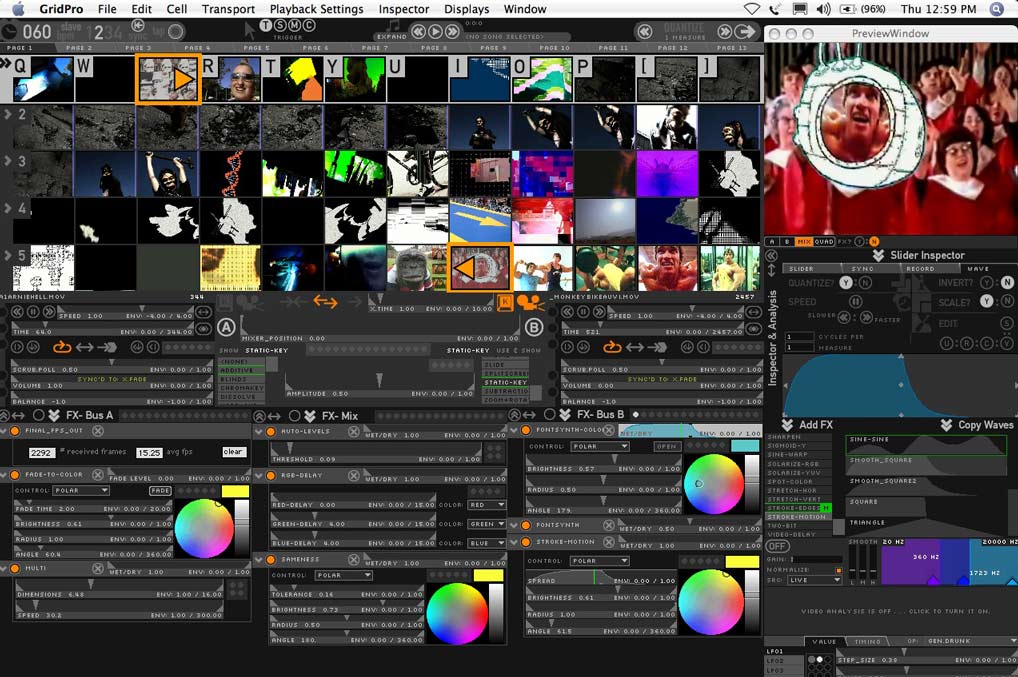
larger Grid Pro screenshot
What it is, What. It. Is.
“I just use my muscles as a conversation piece, like someone walking a cheetah down 42nd Street.”
Expanding on the pioneering work of vidvox.net founder Johnny de Kam ( node.net ), Grid Pro is the highly anticipated real-time video triggering, processing and sequencing software that tries to strike a middle ground between ‘Grid’ (simple video sample triggering software) and VDMX (vidvox’s more sophisticated, flexible and process based app). Clips and live camera feeds can be sequenced and processed on the fly, and blended or effected in a myriad of ways. Plenty of on-screen muscle for the sweatiest of pixel work-outs, yet versatile enough to be customised to suit particular needs.
Trigger Fingers
“I have a love interest in every one of my films – a gun.”
– the ‘Terminator’ who recently legislated limits for selling violent computer games in California.
After loading a bank of clips it becomes immediately obvious that Grid Pro can utilise the computer keyboard to trigger from a grid’ of clips, to either a left or right channel for mixing or cutting between. It’s simplicity is the result though of a long development time utilising strong levels of community input, which really shows in the refined ways the program works. For example, clicking on the left side of a thumbnail sends a clip to the left channel, clicking on the right side sends it to the right – a very helpful and visually succinct way of accessing clips. Latency ( clip triggering reaction time) is good and extensive midi support also allows easy midi triggering. As well as clips, or cutting to a live camera feed, shortcuts are also easily created and accessed, for triggering Grid Pro’s huge range of effects and processes.
Processing
“The most difficult decision I’ve made in my entire life…. I made in 1978 when I decided to get a bikini wax.”
Effects in Grid Pro are very elegantly organised and effects variables can be adjusted by mouse movements ( & recorded mouse movements), oscillators and audio or video analysis which can automatically synchronise effects parameters with the sonic or visual dynamics of any sound or video being listened to or played. Both side channels and the main mix channel can be effected separately, and the FX ‘chains’ created can be saved as presets for easy changing to various effects combinations. Grid Pro makes clip processing and variation a snap, and allows unprecedented options for customized real-time adjustment of clips. Most of the FX are high on functionality and low on cheese, and work differently dependent on the order in which they are chained together ( like effects within Adobe After Effects ). The audio analysis is particularly useful, and is easily hooked up to just about any parameter within the program for beat or frequency driven adjustment of your chosen parameter ( eg crossfade time, motion blur, zoom amount etc ). A built-in ‘Font Synth’ enables cycling through text ( or dingbat fonts) with various advanced lay-out and masking options. In short: much pixel grunt, but more stealth ninja than body builder.
Flexibility
“My relationship to power and authority is that I’m all for it. People need somebody to watch over them. Ninety-five percent of the people in the world need to be told what to do and how to behave,”
– current Californian Governor to 33 million people.
Grid Pro ships with a great range of useful and smartly adjustible transitions ( luma-keying, chroma-keying, various blending and wipe modes etc ), allows recording and replay of both clip sequences and overall output, has an excellent customisability (heavily modular structure, easy custom shortcuts), has built-in playback and analysis of mp3 playlists, and even allows for blending of different ways of adjusting clips – eg it allows combining of data such as mouse movement mixed with an oscillator or audio analysis, creating parameter adjustment as smooth or chaotic as preferred.
Interface
“I think that gay marriage should be between a man and a woman.”
This is where it all comes together. Grid Pro shines with it’s extremely well thought out one-screen interface. Interface hierarchies and bottlenecks are kept to a minimum, screenspace is used incredibly well to give access to so many features, and above all – it becomes very intuitive once played with for a while. Real-time video requires an instrument-like interface just as much as it requires brute processing, and Grid Pro probably sets a new benchmark for real-time video interface depth and highly customisable ease of use.
Requirements
“As you know, I don’t need to take any money from anybody,”
– Arnie, before he started funnelling taxpayers money to his favoured business interests.
Grid Pro needs $250 USD & a G4 or G5 mac. PC version in the works. Very generous discounts for students and educators, and FREE cross-grades for VDMX4 owners.
Verdict
Although the Terminator did defeat Gary Coleman in the Californian election, he reeks a little too much of the 20th century, or perhaps the 19th. In contrast, from within the highly competitive 21st century VJ software world, the release of Grid Pro quickly shuttles them surely to the top or near top of the ‘off the shelf real-time video software’ market. Much is possible with this software.
They’ll be back
Constantly being upgraded and refined, the future Grid Pro pipeline (from near to far away) includes :
– GP 1.1 with a range of minor tweaks, some audio analysis improvements, some new transitions and FX.
– expansion of LFOs ( oscillators ) into ‘behaviours’ with more maths smoothing & gravity like options.
– Integrating the sequencer directly into the media grid, ‘more like zones with patterns and behaviors’
freeframe support
-DV output over Firewire within Grid3
-Exporting of EDL/XML ( editing decision lists – useful for allowing real-time editing later editing on higher resolution footage within linear editing apps such as Final Cut Pro)
-GPU pixel and vertex shader based FX and composition.. on the horizon.
Link to GRID PRO tour
Link to GRID PRO forum
See also :
VDMXX 4 Review
VDMX 2 review
VJ Software Round-Up ( extensive list from 2004 )
Good review, thanks for posting. I am not a Grid user and admit that I use another software title more and it already has some of the up and coming features of Grid Pro 3.0. I’ve used the Grid Demo extensively and I like it. I ‘m keeping my eye on the software and hope to use it more in the future.
thanks Kevin…
aside from any list of features ( which are becoming more standard across the board)
I guess the devil is in the details – how they are implemented…
and then –
how well this suits a particular video artist’s needs….
there’s faster and more complex video apps out there…
but I’m particularly enjoying what is possible with this one…
after a certain amount of use ( like any app i guess )
it has become a lot more intuitive, and the benefits of it’s modular structure are becoming more obvious…
have u dabbled with max/msp and jitter at all?
“-DV output over Firewire within Grid3”
I think without this Grid2 isn’t useful for me. I simply want to use grid to scratch video, and then take it into Final Cut. Live-to-display doesn’t do anything for me. I’m not working in a performance context.
I’ve been monitoring the development of the Vidvox apps for a while, using Prophet and Grid. Now I’m trying to figure out if Grid2 will do anything for me.
Any of the following info would be appreciated:
1. Can Grid2 output DV to disk, or over Firewire?
2. Is there a similar app that can?
3. When is Grid3 expected?
Hiya Xerox –
you’d be best re-posting those questions to the vidox forum –
http://www.vidvox.net
which quite vigorously throws around ideas about grid and it’s future development….
eg last night >>
http://www.vidvox.net/phpBB2/viewtopic.php?p=4666#4666
as best I can though –
1. Depends on your machine. Most VJ apps tend to work with 320×240, but as the machines’ve been getting faster, 640×480 or DV has been possible – with grid and other apps. via Modul8 is quite fast, as vj apps go – http://www.garagecube.com/modul8/ Recording to disk also takes up CPU, so recording via firewire is best… I think DV out is in the works for GP – but I regularly use it to record analogue out to DV camera with my 1ghz laptop and this can work well for certain types of clips, transitions, textures I am wanting etc… Presumably faster machines would do better…
2. See also – http://www.miennetwork.com/movieout/
and http://en.wikipedia.org/wiki/Quartz_Composer which has the best frame rate of any ‘vj app’ I’ve seen.. .requires learning curve, but potentially good for high quality recording of improvised material…
http://hypertext.rmit.edu.au/~dpwolf/blog/ uses it a lot, and is exploring how to develop an actual DV out with it…
3. See vidvox forum – i’d say priorities for vidvox are GP 1.1 with more GPU use, more sequencing functionality, then VDMX 5 beta ( which is sounding killer, but far away ) , then GP 3… the last two requiring more macINtel logistics to be worked out…
I’ve been checking out the links. Thanks very much, Jean. I’ll keep exploring.
Incidentally, I was a bit confused with my first comment. I’m using Grid2 now. And trying out GridPro. And, actually Grid2 seems to do what I want – but I can’t seem to record it easily. I envy you for the S-Video on the Powerbook. I’ll try out MovieOut. If all else fails – I can always shoot the display, I guess.
Cheers, X
hiya xerox –
what type of machine are u using?
at a guess, without an s-video out, it’d be an i-book…
which’d allow you to use an adaptor like this >>
http://www.clubmac.com/clubmac/shop/detail~dpno~133191~name~Apple+Video+Adapter+(connect+to+S-video+or+composite+video+devices)~mfg~M9109G%2FA++++++++++++.asp
if u can get a signal out of your machine, there should be some way of getting that signal into a mini-dv camera for recording..
.
good luck~!
I have an iMac G5. I tried MovieOut over Firewire to a camcorder. With a QT movie, it recognized the camera instantly. With Grid2, nada.
I think you’re right about the Apple Video Adaptor. Excellent idea. That’s how the app is designed to work, isn’t it: outputting to a 2nd monitor/projector?
(I’m completely blinded by my wholesale switch to QuickTime for everything. At home, the TV records QT. At work, footage comes in on tape and gets delivered to final post as QT. A couple years ago, I gave up on tape and analog machines and put a Mac in our living room: TV, DVD, stereo, etc. I was just so frustrated with incompatible cabling, copy protection, crippleware, etc. So I’ve been missing the obvious. I realized this as I descended from the attic and slowly realized that I probably threw away the Canopus analog to digital converter along with the the convertor that never really worked. I couldn’t imagine what use they could be – now that everything was QuickTime and the hassles with analog were over.)
As a result, I wasn’t that surprised as I slowly recalled that the S-Video port on my Sony camcorder is output only. Ya see what ‘um sayin’?! Did I mention it was a Sony? 😉
But I’m gonna get the video adaptor and borrow a camera from work or something and it’ll be fine. Or I’ll drag home a MiniDV deck from work. But it will be the last thing I’ll be doing in the not-entirely-digital world 😉
Thanks for the help, Jean. I’ll leave your comments area in peace.
X
For those using Mac’s and wishing a firewire output for GridPro or whatever:
The SimpleVideoOut X software Download the software directly from Apple. Version 2.0.5 was released in October 2004. Click Download Sample to retrieve the software. The file, SimpleVideoOut.sit, occupies about 370K of disk space
thanks for the tip TV Willie….
[…] in 2004 with screenshots, interviews, smaller VJ software round-up in 2005, vdmx 2, VDMXX 4.0, Grid Pro Vs Arnold Schwarzenegger, v-track, Arkaos video sampler, Arkaos VJ 3, Wildform Flix, Isadora, Livid […]
Arnold Schwarzenegger and incoming Gov. Jerry Brown, Californians might think the California economy’s salvation lies in so-called “green jobs,” which now …